Design To Sell: 8 Useful Tips To Help Your Website Convert

As we see more and more businesses move their services online, and even more that begin their life on the Web, a greater need arises for websites that are designed and built to sell. A great-looking website may achieve the goal of shaping and delivering a strong brand, but its good looks alone aren’t enough to sell the products or services on offer. For that, you need to introduce the element of marketing.
You may want to take a look at the following related articles:
- 10 Principles Of Effective Web Design
- 5 More Principles Of Effective Design
- 9 Common Usability Mistakes In Web Design
- 10 Useful Web Application Interface Techniques
1. Subliminal Suggestion
Research shows that objects and images you see around you can prime you for certain behaviors. For example, a study on children showed that after being shown a Santa Claus cap, they were more likely to share candy with others. The cap embodied the concept of sharing and giving in their minds, and exposure to it primed them for regarding sharing more positively. The same study also exposed kids to a “Toys ‘R’ Us” logo, which had the opposite effect of the Santa Claus cap, making them less likely to share their candy.
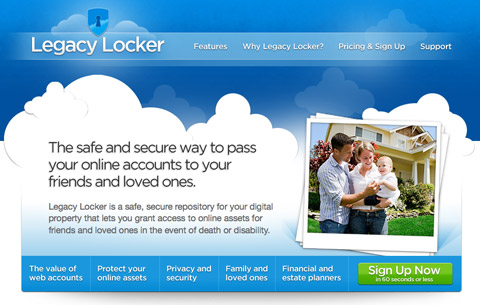
LegacyLocker features a photo of a happy family on its landing page, presumably to evoke in visitors a warm feeling for its product and a desire to care for their loved ones.
When choosing images for your website, think carefully about the message you’re trying to send. Pick images that are meaningful and that embody that message or feeling. Don’t put graphics on your website for their own sake — if they’re not doing a job, they don’t have to be there. Clichéd and overused imagery and stock photos are also dangerous because it may not send the right message in the given context, so select images that get the effect you’re after.
2. Prevent Choice Paralysis
There is a phenomenon in marketing known as “choice paralysis.” Choice paralysis happens when the user is given too many options. Choice is great, but when your customers are presented with too many options, they may be confused about where to go. Nobody wants buyer’s remorse (where a person chooses an item and decides later it’s not right for them), so many people spend more time than they should on the selection process: they become paralyzed.
In fact, according to Barry Schwatz, when customers have too many options to consider, they end up avoiding a specific service or the task in general (Paradox of Choice) – and this is exactly what we as designers need to carefully consider in our designs.
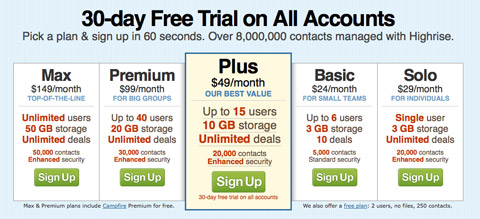
The Highrise pricing list shows a set of monthly payment plans. The most popular one stands out visually to help you make a choice.
To remedy choice paralysis, make it easier for people to find the right product or service for them. Tell them what each option is great for, and then suggest the one they should choose. You can even use visuals to highlight the most popular product and steer potential customers towards it. If the product is not right for them, they’ll pick another, but if they’re confused, a “default” choice helps prevent choice paralysis.
3. Show The Product
When you visit a physical store, perhaps a grocery, you can look at, examine and sometimes even taste the products on sale. You make your purchasing decision based on the information you gather there. Are the tomatoes ripe enough? Are those strawberries red enough? What about the look and smell of that freshly baked bread?
When you sell services or Web apps online, you should do exactly the same thing: show the product. It’s surprising how many websites that sell software don’t actually show screenshots of their applications. Sure, these are intangible goods, digital goods that you can’t touch or smell, but they’re still goods you can see.
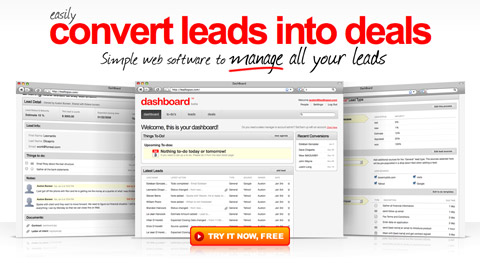
Dashboard puts large screenshots of its lead-tracking app right on the front page.
People make judgments based on what products look like. Why? Because appearance is an indicator, rightly or wrongly, of a product’s usability. This is known as the aesthetic-usability effect.
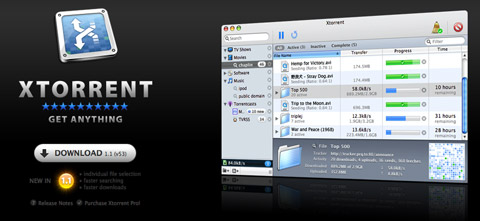
Xtorrent, a torrent download client for OS X, has a product screenshot right at the top of its minimalist landing page.
If people see a complicated and cluttered interface or, in some cases, even just an unattractive interface, they may assume it is not very usable or is hard to learn. On the other hand, if people see an attractive and simple-looking interface, they may start figuring out how it works right then and will want to give it a try. Get people to imagine using your software, and you’ll get closer to closing the sale.
4. Let People Try It
Once you start using a product, you become involved in it. Once you start entering data into it, you begin to make it your own. Every second a user spends trying out features is a second of their time invested in learning and using your product.
When that user is then presented with the question of whether to purchase or subscribe to the product or service, they will more likely say “yes” because they are already involved and have invested time in it. Of course, if the product is bad, then it may turn people off, but then your priority should really be to improve the product until it reaches a level people are happy with.
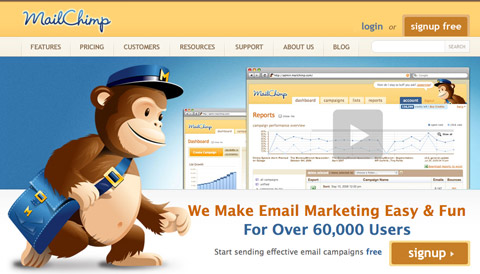
MailChimp, an email marketing service, allows you to start using the service for free with your first 100 subscribers.
In recent years, we’ve seen the emergence of the “freemium” business model. A freemium service allows people to use a portion of it free of charge, but requires a purchase to use all of its features. It gives people a taste of the full product but doesn’t limit them to a trial period. This lets them use the product for free without monetary commitment and then upgrade if they like it.
It’s a great model for many online Software-as-a-Service businesses because once somebody begins using your product, they get sucked in. They start to rely on it, and when they rely on it to do business or manage their life, they will very likely need the premium features down the line and will be happy to upgrade because they already know your service well.
Stories are very important in sales because they get potential customers to imagine what it would be like to use your product. Letting people actually try your product for free goes even further. They don’t have to imagine because they can begin using it right away at no cost. Letting people try out your product, whether through a demo, a trial period or a freemium model, is an excellent way to win customers. Now, this isn’t really a “design” element but is important to mention here because of its potential to drive conversions.
5. AIDA
AIDA is a well-known strategy in sales and stands for: Attention, Interest, Desire and Action. It is relatively simple and describes the sequence of events you should aim for to get a sale. So, first of all, you must capture the attention of your potential customer. Once you have it, you should win their interest by explaining how your product or service can help them.
Then, once they’re interested, generate a desire in them for your product. For example, a story about how this product has helped someone like your visitor can help them imagine what this product would do for them, and especially what benefits it would bring. Indeed, the benefit part is key here because benefits, not features, sell products.
Finally, you need to get people to act. This means purchasing the product or signing up for the service. If people want your product, all they may need is a button to check out. If they are interested but not yet sure, you could use a few methods to motivate them further; for example, creating a sense of urgency with a limited-time offer or limited supply.
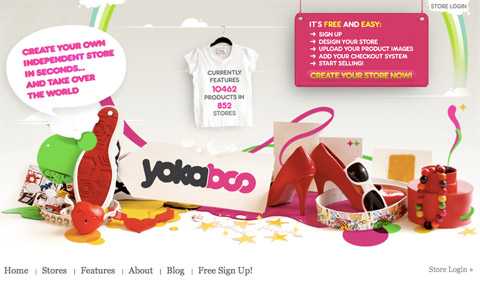
Yokaboo features large, eye-catching graphics. You’re likely to first read the short description on the left. The stats on the t-shirt then help build trust. Finally, you are presented with a call to action on the right.
Now, the AIDA approach applies more to copy — the actual marketing text on the website — than design, so what we need to do on the design side is reinforce that copy, make it stand out and ensure visitors read it. This means making sure the first thing a new visitor sees really grabs their attention. The flow of the page should then direct their focus to the items that achieve the other two goals: interest and desire. Finally, at the end of this flow, we need to convert. So, provide calls to action: “Order now,” “Sign up here.”
It’s important to understand that the design alone won’t sell: you need strong copy in place to do most of that work. The design is there to reinforce and support the copy, rather than the other way around.
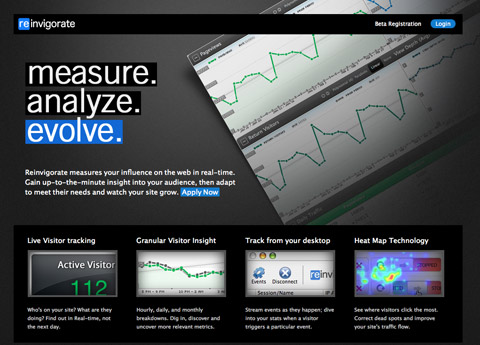
Reinvigorate captures your attention with three large words at the top: “measure. analyze. evolve.” You’re then led to a more descriptive bit of text below and a call to action link.
This means you shouldn’t design a nice website first and then fill up the space with words. Instead, think about the message you want to send out, write the copy and then construct a design that delivers that. If a delivery truck breaks down, then the package does not arrive, but if there was no package in the first place, then the delivery wouldn’t matter at all.
6. Guide attention
To benefit from something like AIDA, you have to lead your visitors through your content. You can do this by aligning items in a manner that will flow, and using images that guide the eyes. For example, if you want to focus attention somewhere, use a big arrow. Our eyes will notice the arrow and will naturally want to see where it points to.
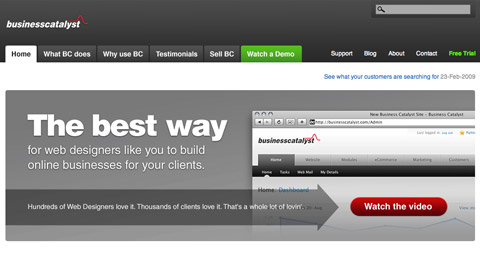
Business Catalyst uses an arrow graphic to lead the visitor’s gaze onto the “Watch the video” button.
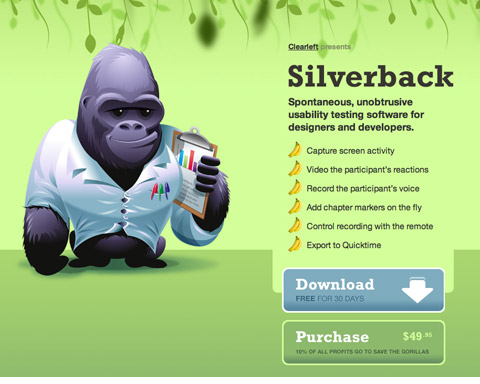
The content on the Silverback site flows down towards the download button. Additionally, the arrow on that button points towards the purchase link.
Structure your content in a way that will flow towards something. Having a bunch of scattered feature descriptions may confuse and make your visitors lost, unless of course if all of the points end in calls to action. If you want to ensure your visitors don’t miss anything, align everything in a linear structure so that the user scans along it. Make sure to end it with the ultimate call to action: that signup or download link.
7. Always Provide Next Actions
ABC: Always Be Closing. If you’re designing a website to sell something, whether a software application or Web service, you should always be thinking about how you’re closing the deal on each page. This doesn’t mean filling every page with big “Buy now” buttons; it means when the customer is ready to buy, they shouldn’t have to look around for the check-out link.
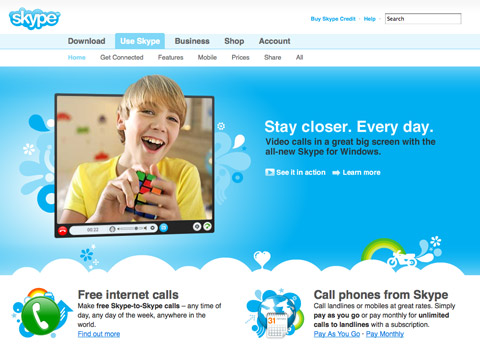
Notice how each of the three bits of text on the Skype website has a call to action after it, whether it’s a “Learn more” or a purchase link.
Always provide next-action links to keep the flow going and to ensure you don’t lose the attention of potential customers. Next-action links can direct the visitor to a page with more information about the product or to the actual page where they can make the purchase or sign up. These links could read something like: “Ready to order? Click here,” “Learn more,” “Take the tour” or “Shop now.”
Don’t leave a dead end on any page: always suggest to your visitors where they should go next.
8. The Gutenberg rule
The Gutenberg diagram (or the Gutenberg rule) is a concept that maps out something called reading gravity. Reading gravity describes a habit of reading in the western world: left to right, top to bottom. The Gutenberg diagram splits up a page into four quadrants: the “Primary Optical Area” in top left, the “Strong Fallow Area” in top right, the “Weak Fallow Area” in the bottom left and a “Terminal Area” in bottom right.
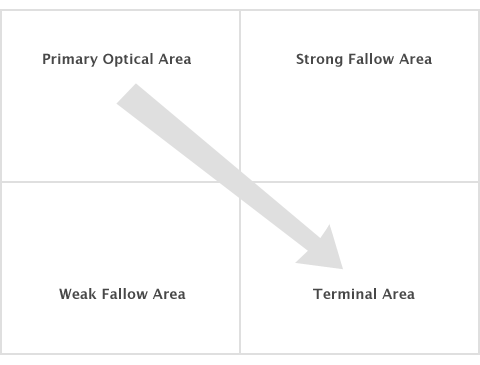
The Gutenberg diagram
It suggests that the bottom left area of the page will get least attention as our eyes scan the page from top left to bottom right and that our glance would end up in the lower right portion of the page. How can we utilize this concept? Buttons and calls to action could be placed in bottom right instead of bottom left, as this is the place where the visitor’s glance is likely to alight.
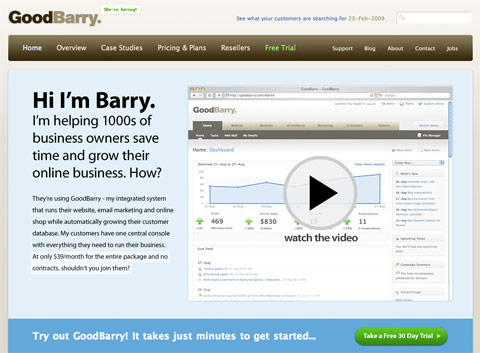
Notice how GoodBarry has the trial signup button placed at the bottom right of the above the fold area of the landing page.
Note that the Gutenberg diagram is more likely to work on pages which have more a balanced distribution of content. If parts of your page have strong highlights through high contrast and bold typography, then those areas would likely attract more attention and so will direct the way a user scans the page.





Derek Keith
April 6th, 2009 1:25 amVery nice article, as usual!
m_dzo
April 6th, 2009 1:43 amGreat ! thanks again for all your precious articles… SM rules!
Bhargav
April 6th, 2009 1:49 amNice Tips.. Thank you…
Looking forward for more…
Pascal
April 6th, 2009 1:49 amNice article! good job.
I would like to see more articles like these there really helpfull.
Greetings Pascal
Mahbub
April 6th, 2009 2:09 amYou just made me recall my MBA course mentioning AIDA in promotional marketing ;). Nice write up.
Goran
April 6th, 2009 2:09 amIs seems like storytelling of a website. ;-)
MaXsiM
April 6th, 2009 2:19 amExcellent. Simply excellent.
Creamy CSS
April 6th, 2009 2:19 amThanks for really helpful post,.. I’m going to use some tips on my website ;)
Gorilla
April 6th, 2009 2:24 amHow many posts have featured the Silverback website lately? it’s allright, but it’s not that good! Any special interests in this site that I don’t know about?
Hollis Bartlett
April 6th, 2009 2:30 amThat. Was. Awesome. Best post I’ve seen here in a while. Really useful.
Matt
April 6th, 2009 2:35 amReally nice read. helpfull too!
christine
April 6th, 2009 2:51 amWell done! Nice read.
A Pinch of Cheer Handmade Accents
April 6th, 2009 3:02 amGreat article, thanks! yes…benefits, not features.
Tomaz Zaman
April 6th, 2009 3:09 amGreat article, thank you
Dave Bowers
April 6th, 2009 3:28 amGreat article – I’m not convinced about the application of the Gutenberg theory to the medium of the web though. It seems to contradict Neilsen’s suggestions that the eye naturally moves across a web page in an f-shape, meaning that the lowest-value content is placed in the lower-right of the page.
Henne
April 6th, 2009 3:30 amPretty helpful!
I’d like to read more Hints&Tips like “8. The Gutenberg rule”.
I’m going to remember this post, for my coming-up projects!
Whoa Not MailChimp
April 6th, 2009 3:35 amShame you choose to highlight MailChimp. People might think they’re a legitimate business. Been spammed out the wazoo from clients of theirs, no end in site. Unsubscribe? Might as well call it ‘subscribe me ten times over’. Their abuse pages are usually broken, and their complaint page requires you to pluck some obscure value from the url embedded in the email header. Good luck finding that, Grandma. Gotcha, and you’ll never leave!
Pereira
April 6th, 2009 3:42 amwebdesigner’s dream article
Johanna
April 6th, 2009 3:48 amSo helpful for someone like me who is still learning and thirsting for knowledge!
Thanks so much.
v-render
April 6th, 2009 3:59 amwow .. much helpful .. last point is really true .. i will try to implement those points in my next designs ! thank you sm and author
iAngel
April 6th, 2009 4:15 amThis is a brilliant article, just what i’ve been looking for, Many Thanks
Tom Bradshaw
April 6th, 2009 4:34 amInteresting article… some good points to bear in mind when I design my next site. Many thanks!
azizbaba
April 6th, 2009 4:34 amfantastic, thanks for your effort.
Timothy
April 6th, 2009 4:35 amIncredibly useful. Thank you. Aaaaaaand del.icio.used!
Martin Leblanc
April 6th, 2009 4:46 amGreat stuff.
Alex
April 6th, 2009 4:48 amExcellent article! SM pay attention…. POST more articles like this and you will get MORE subscribers, guaranteed. I am subscribing right now! :)
Dmitry
April 6th, 2009 4:59 amDave: Nielsen’s research used text heavy sites as samples, and so there is no surprise the ‘f-shape’ emerged, considering we read left to right, top to bottom. The browsing pattern will be dictated by the structure of the site and especially how prominent the elements are. A lot of content heavy sites will yield the f-shape, but more minimalist marketing pages may not. If something on the page really screams for attention, it will be looked at.
The Gutenberg rule is just another tool to know about when building your site but should definitely not be followed blindly. A/B testing and other forms of usability testing should be used to see if it works for you.
Hafihz
April 6th, 2009 5:14 amI’m a marketeer, and this list is superb stuff.
Chris Lentz
April 6th, 2009 5:21 amGreat Post! I am defiantly going to work some of these elements into my future designs.
John Mathews
April 6th, 2009 5:37 amGood article. What’s the Gutenberg rule for other cultures (Chinese, Arabic) ?
Paul
April 6th, 2009 5:37 amWonderful! Thank you!
Justin Floyd
April 6th, 2009 5:40 amThis is relevant and useful material. Thank you.
Telexmyknee
April 6th, 2009 5:41 amDefinitely interesting, but would be much more so if you picked a page out there in internetland (one of mine perhaps :) ) and did your magic on it – and see what difference it actually makes after a couple of weeks have elapsed with the revised content.
Dadii
April 6th, 2009 5:48 am@Gorrilla – I agree about the over-use of certain sites/brands in SM articles lately. If the fanboys really must over-hype them, perhaps SM can run a series of very detailed case studies on these sites/apps and then BAN them from being used as an example of how perfect they are for design/IA/content/creative/code/ideas/monetisation/word peace…
Adrian
April 6th, 2009 5:48 amVery well done.
Tom Okeefe
April 6th, 2009 6:04 amAnother company to look at and that paved the road for many is GoToMeetings.com It’s not the best looking Visual Design but they mastered the way to get people to 1. Try the product. 2. Buy It. it’s a formula they tweaked over the years that works. Features/Benefits and clear CTAs and many other elements. They’ve flooded the web with landing pages and micro sites and tested non-stop until they came up with a winning formula (for them).
AIDA is key!!!!
The most important thing is to TEST TEST TEST and TEST! It’s the web the shelf life is short and can be switched in minutes. Try different versions of everything that is listed above until you find the best formula that works for your product.
Good article.
-Tom
suitcaseofcourage
April 6th, 2009 6:14 amI strongly disagree with the Skype website being held up as any type of best practice. As good as the service is, the website is equally bad. Nearly impossible to find your way around, and actually sign up for the services you want. And whenever I click on shop, for some reason it takes me to the Japanese version. Has been that way for a few years. Am I the only one who sees that? That site is terrible, although it looks pretty if you aren’t actually trying to accomplish anything.
web2000
April 6th, 2009 6:27 amI agree with everyone here.. This is a phenomal How-To article. Thanks for sharing!
WebAir
April 6th, 2009 6:46 am…usefull article!
Rick Whittington
April 6th, 2009 6:47 amGreat article, thanks for writing it!
I think that companies need to be careful to make sure they communicate the essence of their products, not just simply show them. Some things that may help is showing additional photos and angles for product photos, letting the customer zoom in on product photos to see detail, and for clothing or even shoes, show the product on a variety of different sized models to show customers how things will fit.
Benjamin Field
April 6th, 2009 7:05 amTremendously useful.
Tom Okeefe
April 6th, 2009 7:05 amAfter looking through the examples again a few that kinda bug me…
Good/BadBarry–
I would think that SEO will like to re name GoodBarry to BADBarry. Having text be a graphic is BAD. It’s fine to a point to have headlines if you want to control the look but you should stay away from making that much copy a graphic.
Sykpe–
that example shown would be nice if that was the complete site. It’s not. You click on one link in the header it changes to that example. You click on another it changes it’s visual design AGAIN. As for having CTAs used I would agree YES it’s on point. It’s just that it falls apart after the user clicks a link.
Silverback–
Seems like a lot of wasted space. Also no clear direction or action that will make me want to scroll to view content and some important content. It has no navigation and a bad example to show since yes it hits some of your points but breaks the others.
Reinvigorate–
As much as I do love the use of blue and imagery that captures my attention the one problem I have with this is maybe more of a UX problem. When I click Apply Now a drop down appears upper right. that seems odd to me. Apply Now or Beta Registration? Which is it? Then again I do like this example. :)
As for Visual Design (off topic) all these sites are in the same family of Web 2.0 trendy jump on the bandwagon designs. Hey as long as it works for these products that’s all that matters. Right?
Still a good article and it would make the web more enjoyable if people would follow these tips.
Matt Antonino
April 6th, 2009 7:08 amWhat happened to the other 4 tips!? It looks like this was “12-tips-to-help” in the title when you started writing but then it became 8? lol I feel … almost gypped! Great article though!
Olivia
April 6th, 2009 7:39 amThank you for this VERY helpful information. I can use it straight away.
Dmitry
April 6th, 2009 7:56 amThanks for the positive comments everyone!
Regarding examples: the choices are there to highlight individual points — the rest of the site may or may not follow all the best practices. Also: I’ll make sure to use less gorillas and chimps in the next article ;)
madame2
April 6th, 2009 8:10 amGreat article; thanks for the tips!
Jason Grant
April 6th, 2009 8:20 amI like it very much. Nice and scientific approach to describing what works and what doesn’t.
Igor
February 11th, 2012 11:13 amSOAS007 on April 14, 2011 @00nerd4 I have never heard Polish polepe called ‘polarks’ ( original recording)before, or heard jokes against them. We have loads live in the UK, I heard a satirist say something like , how dare they come here , do the jobs we are too lazy to do , and pay our taxes, but thats not racist.
Chris Robinson
April 6th, 2009 8:56 amgreat post, dugg!
Simon Day
April 6th, 2009 9:11 amOne of the best posts, well done!
KC
April 6th, 2009 9:52 amThank you for a very informative article.
Bo Pentecost
April 6th, 2009 10:26 amShould I thank you that now I have to go back and rearrange my landing page! Thank you!
Rick James
April 6th, 2009 10:56 amLove this article…the AIDA concept is great and very well executed with this yokaboo portal…overall a great study…thanks for sharing
One Time
April 6th, 2009 11:01 amThe 37 signals reference sort of debunks itself. Mentions less options are better, then shows 37 signals pricing plan as proof of opinion. The 37 signals pricing plan is notoriously known for being too complex!
MarcoBarbosa
April 6th, 2009 11:28 amThis gotta be the best article I’ve read in smashingmagazine!
Thank you!
Navdeep
April 6th, 2009 12:09 pmReally useful information.
Esteban G.
April 6th, 2009 12:37 pmHey SmashingMagazine!! and Dmitry!! I’m Esteban from Leadlogsys.com. Thank you so much for featuring our website. This article is great and right on point!
Charles
April 6th, 2009 1:02 pmI hate the word “convert” so much in this context. It dehumanizes the visitor and treats them like a prospect rather than a human. So much of the design process depends on the right psychological perspective.
Klaye Morrison
April 6th, 2009 1:58 pmGood Barry has been featured on SM about a billion times. Yes it’s cool, but it is hardly different. There are plenty of Business Catalyst resellers out there that are all quite similar in the way that they bring the product across to their audience.
James
April 6th, 2009 2:33 pmIs there a connection between the Good Barry advertisement at the top of the article and having it and Business Catalyst featured as examples?
awhollywood
April 6th, 2009 3:13 pmGreat post, but can’t you come up with something better than the Silverback app? It’s on 80% of your website lists.
Dave
April 6th, 2009 5:25 pmMarketers spend so much time and energy trying to get visitors to sites, now it’s time to start focusing on closing the deal. Search marketers are calling it “post-click marketing”, others persuasive design. No matter its name, I think it is one of the next big waves on the net. There is a ton of social psychology and decisioning research waiting to be applied.
RickHenderson
April 6th, 2009 5:44 pmNice article with interesting content. I saw a book mentioning the change in the “Net Generation” whose reading patterns do not follow the Gutenberg Rule or “Z-pattern”. It may be that big graphics and buttons in odd positions on many pages (ie. Like large ads on the right side of a blog post) may be *altering* the way people read.
Scott
April 6th, 2009 5:47 pmIs Example #2 an example of Choice Paralysis or Price Paralysis?
Kane
April 6th, 2009 6:22 pmGreat, great article. I’d love to see more articles like this that go beyond simple aesthetics and help us simple folk understand some of the methods behind the madness. :)
Peter
April 6th, 2009 7:22 pmThank you. How do the Gutenberg eye-catching quadrants (upper left to lower right) compare with Google eye-tracking studies (largely upper left of ads lists) and what happens to the eye in scrolling down? Can lower left become upper left & lower right become upper right?
Naomi
April 6th, 2009 7:35 pmAs an entrepreneur working on a new site, this is an invaluable article!
Alberto Villalobos Solano
April 6th, 2009 9:10 pmReally great article, i have bookmarked it, cause i need this in everyh project i need. it can be applied to most of the websites aniway
thank you
Daniel
April 6th, 2009 10:28 pmThis is what I call digital marketing.
Congratulations!
Arora.N
April 7th, 2009 12:04 amHey,
Thats really very helpful and amazing set of guidelines. Thanks so much. Hope to recieve more of such set of fantastic business support often
Cheers
Farid Hadi
April 7th, 2009 12:06 amThis is just a great post, with solid examples, on a very important topic.
Thanks for a useful, smashing article!
gr8pixel
April 7th, 2009 12:56 amgreat article! :)
smalllotus
April 7th, 2009 1:08 amNice article :) especially “AIDA”~~
mcfee
April 7th, 2009 1:34 amsuperb!
Mark
April 7th, 2009 1:54 amGreat article – some really good ideas here.
probir Das
April 7th, 2009 2:16 amI agree with this topic.
Dan
April 7th, 2009 5:52 amVery nice article.
Nancy Moore
April 7th, 2009 5:59 amHi
i like this
this is is a very nice piece of information
bs.kishore
April 7th, 2009 6:03 amA fantastic and refreshing post.Without dought it’s s m a s h in g stuff !
Tom
April 7th, 2009 7:43 amVery good tips, I’ll have to go over my own websites again and see how they measure up.
Tom
jaime
April 7th, 2009 9:00 amGREATE GREAT GREAT GREAT!!!Maybe the best I read lately
Jason Pelker
April 7th, 2009 9:02 amI’ve got to recommend this March 2009 article from Zygote, as well: Designing to Sell. I reference both entries in my Glengarry, Masturbation and Web Marketing article I wrote today.
Chad
April 7th, 2009 9:27 amPowerful stuff! Thanks for the great article.
Berni Wall
April 7th, 2009 10:04 amFabulous article! Lots of common sense, good advice here. Thank you.
Len Davis
April 7th, 2009 12:33 pmgreat article… I’ve implemented a lot of the tips in our site Bumper Stickers. Now all you need is traffic!
Zaid Rasid
April 7th, 2009 1:26 pmThis has to be one of the better articles I’ve read in a while!
Thanks.
Marek Jan | Webcentric
April 7th, 2009 2:26 pmVery informative, many clients think that websites are like business cards.. or perhaps store fronts. Sure.. I agree.. but they should also be a place where the products can be examined, and purchase or choice for purchase made up right there and then. There are a number of ways to bring visitors closer to products. Oneof them is intuitive navigation. Sure.. a floating baloon looks “cool”.. as a button.. but in the end.. the person want to “check out your goods”, not chase animations all over the page. Using AJAX to quickly select alternative views of products, or zooming in parts of items, is an excellent way to consider enhancing your site.
bycolor
April 7th, 2009 5:50 pmPretty nice and straight forward article. Thanks.
nasip
April 8th, 2009 4:43 amVery nice article.
Malcolm
April 8th, 2009 10:31 pmFantastic article, this surely helps a lot..
Thanks a million :)
Shir - Israel
April 8th, 2009 11:14 pmvame to me right in time. This is very very useful. Thanks!
Melanie
April 9th, 2009 7:32 amAwesome article! I’m definitely passing this on…
Thanks.
Andrea Costantine
April 9th, 2009 11:24 amGreat information on making your website work for you!
mauco
April 10th, 2009 10:07 amDmitry, this is a priceless article! very interesting article. very informative with loads of practical advice. i love it.
Emma
April 10th, 2009 4:37 pmGreat article!
Alt Design
April 11th, 2009 4:07 amUseful tips! Thanks!
kamlesh khatri
April 15th, 2009 2:18 amthis is very useful information.
Christa Taylor
April 16th, 2009 9:06 amAs a graphic designer, this was sooo helpful!
Thank you,
ikosoma
April 16th, 2009 9:16 amnice hints,
one comment:
subliminal means that the picture is not recognized by the recipient (consciously), e.g. because it is presented too fast. So the headline 1 fails the example. Better would have been just “priming effect”.
babyboy
April 16th, 2009 10:27 pmOne of the best articles you’ve posted up to date.
yanie
April 20th, 2009 11:31 amnice, your posts are always interesting!
SoundsGood
April 22nd, 2009 4:48 amGood stuff.
Question: where can we find a web designer that can produce great material like this but doesn’t break the bank?
Any suggestions? Thanks.
Issa Qandil
May 16th, 2009 4:56 amGreat post they are really a very useful tips thx fr sharing
Michel
May 27th, 2009 7:57 amNice post man!
Digital SqFt
July 4th, 2009 10:46 pmI thought this was a great article! Very simple but it is what people need to know. Thanks!
kel
August 25th, 2009 5:51 amVery helpful. Thank you!
jwo
October 18th, 2009 5:22 amGreat post, just one question, what does “fallow” mean?
(as found in the Gutenberg Rule)
Sato
February 13th, 2012 8:39 pmWhoa Not MailChimp April 6th, 2009 3:35 am Shame you chosoe to highlight MailChimp. People might think they’re a legitimate business. Been spammed out the wazoo from clients of theirs, no end in site. Unsubscribe? Might as well call it subscribe me ten times over’. Their abuse pages are usually broken, and their complaint page requires you to pluck some obscure value from the url embedded in the email header. Good luck finding that, Grandma. Gotcha, and you’ll never leave!
Erik Wallace
November 2nd, 2009 7:54 amGreat article! One note on the GoodBarry example, the homepage has changed drastically since Adobe bought their parent company.
Andy
November 24th, 2009 7:11 amGood job, i really proud of you webmasters. keep your site better. from andy [ anditip.com ]
Fernando de Sá
May 25th, 2010 7:16 amSolo discrepo en una cosa: el diagrama de Gutenberg es correcto, pero no su argumento, ya que ha sido probado en culturas donde el sentido de la lectura es distinto a la occidental y funciona de igual manera, lo que hace del argumento de la lectura algo inválido. La justificación a esto se encuentra en la “proporción áurea” y en el espiral que se crea al combinarla. De ahí su justificación. Por el resto del articulo totalmente de acuerdo, y considero que la prueba y error sigue siendo el mejor método para entender el comportamiento humano.
Brett Relander
August 12th, 2010 9:12 amThanks for the info. Considering the psychology of your website visitors is very important and begins getting into the science of marketing. It’s a little scary how much we can all be manipulated, but that’s the nature of the marketing game.
Jeff Ramos
August 15th, 2010 6:42 pmThis was really quick but really simple and I’m already putting some of these practices to use. Thanks for the reinforcement!
Christian Mungle
May 19th, 2011 1:46 amPlease let me know if you’re looking for a writer for your weblog. You have some really great articles and I feel I would be a good asset. If you ever want to take some of the load off, I’d really like to write some articles for your blog in exchange for a link back to mine. Please send me an e-mail if interested. Cheers!
Manie Crescenzo
November 17th, 2011 6:06 amYou have lots of useful pointers on this site. This is a well written article that I have bookmarked for future reading. Have a fun.
Dangerous Dave
January 26th, 2012 8:01 amThanks, great info.