9 Common Usability Mistakes In Web Design

By now, all good designers and developers realize the importance of usability for their work. Usable websites offer great user experiences, and great user experiences lead to happy customers. Delight and satisfy your visitors, rather than frustrate and annoy them, with smart design decisions. Here are 9 usability problems that websites commonly face, and some recommended solutions for each of them.
You may also be interested in the following related posts:
- 10 Usability Nightmares That You Should Avoid
- 30 Usability Issues To Be Aware Of
- 12 Useful Techniques For Good Interface Design
- 10 Useful Web Application Interface Techniques
1. Tiny clickable areas
Hyperlinks are designed to be clicked, so to make them usable, it makes sense to ensure that they’re easy to click. Here’s an example of links that are far too small; clicking them is harder than it should be. These are the comments links on Hacker News, a social news website. (Clickable areas are highlighted in red):
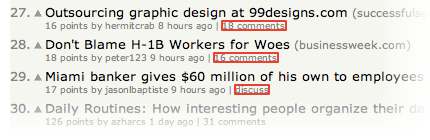
Here’s an example of the same interface element, the comments link, but this time with a much larger clickable area:
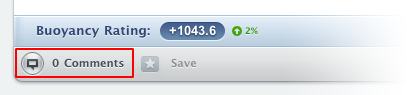
Newspond comments link.
Why would we want a larger clickable area? Simple. Because our hand movement with the mouse isn’t very precise. A large clickable area makes it easier to hover the mouse cursor over the link. To ensure we get a large clickable area, we could either make the whole link bigger or increase the padding around the link using the CSS “padding” property. Here’s the code:
<a href="http://www.examplesite.com" style="padding: 5px;">Example Site<a>
The CSS has been placed inline together with the markup to make the example simpler, but in real life you’ll likely want to add this styling to your CSS file by giving the link a class or id and targeting it with that.
You can read more about padded link targets for better mousing in a 37signals article on padded link targets. According to the article, padding provides users with “a feeling of comfort. It’s just really easy to click the links. It feels like the links are working with you instead of against you.”
2. Pagination used for the wrong purpose
Pagination refers to splitting up content onto several pages. This is often found on websites that have long lists of items; for example, products in a store or pictures in a gallery. Using pagination for this purpose makes sense because displaying too many items on one page would make the page slower to download and process.

FeedMyApp uses pagination in the right way: to display its vast list of apps in digestible chunks.
But there is another way that pagination is used on the Web today. Content pages, like blog articles, are sometimes split into several pages. Why is this done? What’s the gain? It’s unlikely that the article is so long that it requires pagination; in most cases, it is used to increase page views. Because a lot of blogs and magazines get their revenue through advertising, getting more page views (i.e. individual page loads) boosts their viewing statistics and allows them to charge more for each ad.
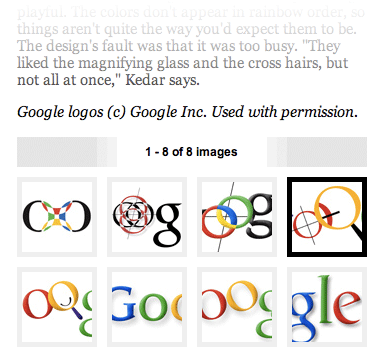
The Wired article about Google’s logo is split into eight pages, making it very difficult to read.
While this may seem like an easy way to squeeze more money from your ads, it poses two main problems. The first is that it’s just really, really annoying. Having to load several pages just to read one article isn’t fun. You’re creating a barrier for your visitors that doesn’t have to be there.
The second reason has to do with SEO (search engine optimization). Search engines use the content on your page to make sense of what it is about and then index it accordingly. If the content is split into several pages, it is diluted, and so each page makes less sense on its own and holds less keywords about its topic. This may negatively affect the ranking of the article in search engine results.
3. Duplicate page titles
The title of each Web page is important. Page titles are the pieces of text we write between the <title> tags in the <head> section of our HTML code. Sometimes people create a generic title while working on their website’s template — their website’s name, for example — and then re-use the same title across the whole website. This is wrong because it robs each page of a couple of key benefits.
The first benefit is that a good title communicates to your visitors a lot of information about what the page is about. People can quickly figure out if they’re in the right place or not. Remember that this title doesn’t just show at the top of the browser window; it’s also shown on the search engine results pages. When people see a list of results on a search engine like Google, they read the page title to figure out what each page is about. This alone is a good enough reason to spend a little time optimizing your page titles.
The second reason has to do with SEO. Search engines need different information to rank the results of a particular query. Page title is one of the more important pieces of information they use to gauge how relevant your page is to a particular search term. This doesn’t mean you should load as many keywords as possible into the title — that defeats the first benefit — but you should ensure that each title succinctly describes the content of the page, including a couple of words you think people will search for.
Here’s an example of a good page title. This is a Smashing Magazine page title as seen in Safari:

Here we have the title of the article, the category of the article and the name of the website. Putting the name of the website last puts more emphasis on what the page itself is about, rather than on website branding, which is still there. Here’s what the HTML code looks like in the markup:
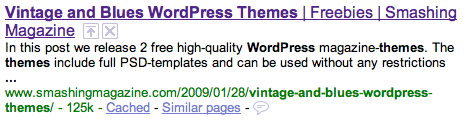
<title>Vintage and Blues WordPress Themes | Freebies | Smashing Magazine</title>
And here’s how the page is displayed in a Google search result:
4. Content that is difficult to scan
To ensure that your website is usable, you cannot only have a good design; you also need good copy. Copy is a term used to describe all of the text content on a website. Yes, good design will guide your visitors around the website, focus their attention on the things that matter and help them make sense of information chunks; but visitors will still need to read text to process information. This makes copy an essential part of your overall website design.
Before you can write good copy, though, you need to understand how people will actually view your website. Don’t assume that your visitors will read everything from top to bottom. That would certainly be great, but unfortunately that’s not how it works. The Web bombards people with information, and most of us try to consume as much of it as possible. This leads to very frantic browsing behavior: we jump from one piece of content to another, from one website to the next. People tend not to read websites top to bottom; they start reading whatever pops out at them first, and then move to the next thing that captures their interest. The pattern looks a little like this:
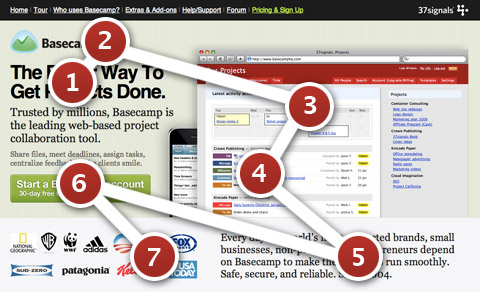
The Basecamp landing page.
The red circles indicate the areas where visitors tend to focus their gaze, and the numbers indicate the order in which they look at these elements. Users dash from one interesting part of the page to another. To take advantage of this chaotic browsing pattern, you need to structure your copy a certain way. Here are a few pointers:
- Have a few points of focus. These are the parts of your page that attract the attention of visitors. This can be achieved by stronger, higher-contrast colors and larger fonts. You can also use images, such as icons, next to text to give these areas even more visual pull.
- Each focus point should ideally be accompanied by a descriptive heading. Without reading the copy any further, visitors should be able to understand what this bit of content is about. Don’t make headings mysterious or vague to draw people in. Keep them informative yet concise. People want information quickly, and withholding it only annoys them.
- Any other text should be short and easy to digest. Provide just the essentials, and strip out the rest. In most cases, extra text that copy writers put in to make a point less ambiguous only adds dead weight. People will read bite-sized pieces of text but are put off by long paragraphs. Cut your copy down until no fat is left to cut.
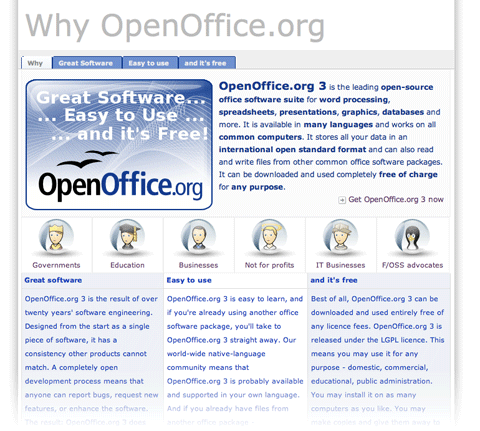
The “Why you should use OpenOffice” page could definitely use improvement. No clear points of focus are provided, aside from the large banner at the top; and the copy is grouped together in huge chunks, making it daunting to read.
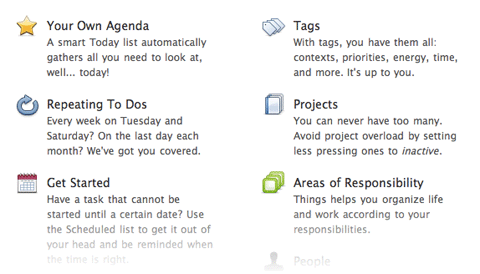
Things app’s features page splits up each feature into little bite-sized segments, each with its own icon and heading. This makes the list easy to scan. To make copy even more effective, list actual benefits rather than feature names.
5. No way to get in touch
User engagement is important if you want to build a successful community, and communities are important if you want to build successful websites and social Web apps. User engagement is also important if you want to build loyal customers. Quickly answering people’s questions and fixing their problems doesn’t just mean that you have good customer service — it means you care, and your customers and visitors will appreciate it.
But many websites still don’t give visitors an easy channel for getting in touch with the company. Some websites don’t even have an email address or contact form on them.
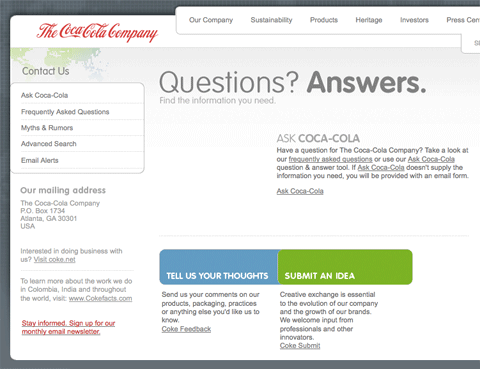
When you click on the contact link on the official Coca-Cola website. you’re presented with this page. No email, no phone number. Most of the links lead to automated FAQs; the feedback form requires your address and age and has a 500-character limit; the “Submit an idea” form is two pages long, with terms and conditions attached. It doesn’t look like Coca-Cola really wants you to contact them.
Sure, putting your email address on the Web will likely attract a lot of spam, but there are a couple of solutions.
Enkoder is my favorite solution for putting email addresses on the Web. Enkoder is an application that comes in two flavors: a free one for Mac OS X, and another free one as a Web app. It encrypts any email address that you give it and gives you a bunch of gibberish JavaScript code to put on your page. When the page with the code loads, your email magically appears as a clickable link. Bots scouring for email addresses won’t be able to interpret the code — at least that’s the plan.
You could also use contact forms to bypass the problem of showing your email address on a page; however, you’re still likely to receive spam unless you put some good Captchas or other spam protection mechanism in place. Keep in mind that things like Captchas are barriers to user interaction and will likely degrade the user experience.
Forums to the rescue. Online forums are a great communication channel that can be an alternative way for users to get in touch. A public forum is better than a simple contact form or email because your customers can help each other on a forum. Even if you don’t personally respond to a customer, another helpful customer may help that person out, solving his or her problem.
GetSatisfaction is a Web app that works like a forum. Users can post their problems and feedback as topics on the board, and customers and staff can respond to them. Users can add comments to elaborate on their problem. Whether you go with a hosted solution like GetSatisfaction or roll your own message board, a two-way communication channel like this is a great way to keep in touch with your customers.
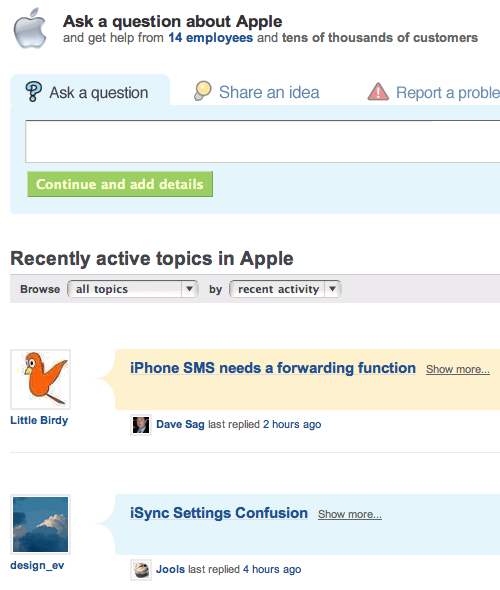
The GetSatisfaction forum for Apple.
6. No way to search
A lot of people start looking for a search box as soon as they arrive on a page. Perhaps they know exactly what they’re looking for and don’t want to spend time learning the website’s navigation structure. Jakob Nielsen calls these people search-dominant users:
Our usability studies show that more than half of all users are search-dominant, about a fifth of the users are link-dominant, and the rest exhibit mixed behavior. The search-dominant users will usually go straight for the search button when they enter a website: they are not interested in looking around the site; they are task-focused and want to find specific information as fast as possible.
Whether you run an online shop or blog, you need search. People may come looking for a particular product or for an article they remember reading a while back, and chances are they’ll want to find it with a quick search. The good news, if you haven’t already implemented search on your website, is that it’s very easy to do.
You don’t need to code your own search feature; search engines like Google and Yahoo have very likely already indexed most, if not all, of your website’s pages, so all you need to do is pick the one you want to use and plug in a search box. Here’s the form code for using Google as your search engine:
<form action="http://www.google.com/search" method="get"> <fieldset> <input type="hidden" name="sitesearch" value="smashingmagazine.com" /> <input type="text" name="q" size="31" maxlength="255" value="" /> <input type="submit" value="Google Search" /> </fieldset> </form>
And here’s the one for Yahoo:
<form action="http://search.yahoo.com/search" method="get"> <fieldset> <input type="hidden" name="vs" value="smashingmagazine.com" /> <input type="text" name="p" /> <input type="submit" value="Yahoo Search" /> </fieldset> </form>
To make it work, all you need to do is change the value of the “hidden” field to your website’s domain name. This will limit the scope of the Google or Yahoo search query to just your website. You may also want to modify the value of the “Submit” text to say whatever you want.
7. Too much functionality that requires registration
Your website may have some content or features that require visitors to register before using. That’s great, but be careful how much content is put behind this registration shield. Very interactive Web applications, such as email, document editing and project management, restrict 100% of their functionality to registered users. Other websites, such as social news websites, do not. I can browse all the stories on Digg and Reddit without having to log in; users do not have to identify themselves to enjoy some functionality.
When you implement a log-in barrier, be careful that you don’t lock away features that don’t really need user identification. Some blogs require people to register before posting. Sure, that will significantly decrease spam, but it will also significantly decrease the number of comments you see, too.
User participation on your website is affected by how many barriers there are. Removing barriers such as registration will almost certainly increase user participation. Indeed, once users start using your website, they will more likely sign up, because they’re already involved.
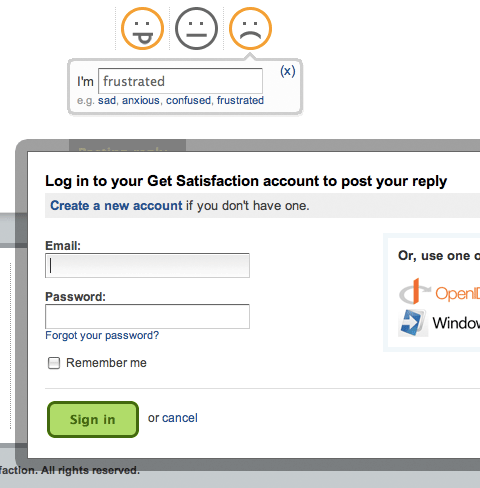
The GetSatisfaction interface allows you to fill in your comment about a company or product and then click the “Post” button. Instead of seeing your feedback posted, you’re greeted with an unexpected “Log in or register” message. Not good, considering the customer may already be frustrated.
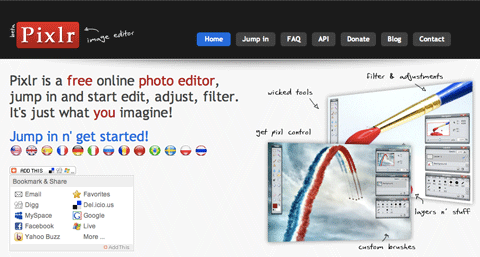
The landing page for Pixlr, an online graphic editing app, has a link titled “Jump in n’ get started!” Clicking on it opens the app. No trials, no registration; you test drive the app right away.
Posterous, a blog hosting network, doesn’t even require registration to start using it. Just send an email with your post, and a new blog is created for you.
8. Old permalinks pointing nowhere
A permalink is a link to a page that isn’t meant to change; for example, a link to a blog article such as the one you’re reading now. Problems occur, though, when a website moves to another domain or has its structure reorganized. Old permalinks pointing to existing pages on the website become dead unless something is done about them. That something is called a 301 redirect.
301 redirects are little instructions stored on your server that redirect visitors to appropriate pages. So, if someone arrives on your website using an old link, they won’t see a 404 error page (“Page not found”): the 301 redirect forwards them to the right location, provided that you’ve set it up correctly. The number “301″ designates the type of redirect that it is: permanent.
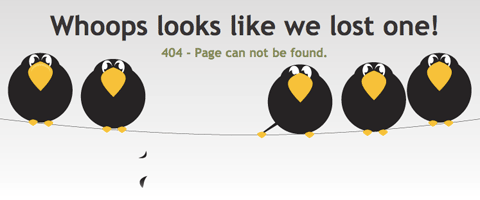
Frye / Wiles 404 error.
There are various ways to do 301 redirects. How they’re implemented depends partly on the Web server you’re using. Here are the basics of handling 301 redirects on the most popular Web server right now, Apache.
The following code should go in a file called “.htaccess” in your main website folder. Yes, the file name begins with a full stop. This means it’s a system file, which standard file browsers tend to hide by default. So, if you can’t see it using your file browser or FTP client, turn your “Display invisible files” option on. Just create or (if it’s already there) edit this file using your editor of choice. This file is retrieved whenever a visitor arrives on your website, and any redirect rules you put in there will be applied.
Here’s a simple 301 redirect code:
RewriteEngine on Redirect 301 /oldpage.html /newpage.html
The code is fairly self-explanatory. When somebody tries to access “yoursite.com/oldpage.html,” they will immediately be redirected to “yoursite.com/newpage.html.” The “RewriteEngine on” bit at the top ensures that the mod_rewrite engine is turned on (the default is off). This is the engine that handles the redirects.
9. Long registration forms
Registration forms are barriers. They are barriers because it takes effort to fill them in, and the task itself is no fun. People have to invest time and effort to register, and then they have to invest even more time and effort in future to remember what user name and password they used.
We can shrink this barrier by making the sign-up form as short as possible. At the end of the day, the purpose of a registration system is simply to be able to identify each user; so, the only requirements are a unique identifier, such as a user name or email address, and a password. If you don’t need more information, don’t ask for it. Keep the form short.
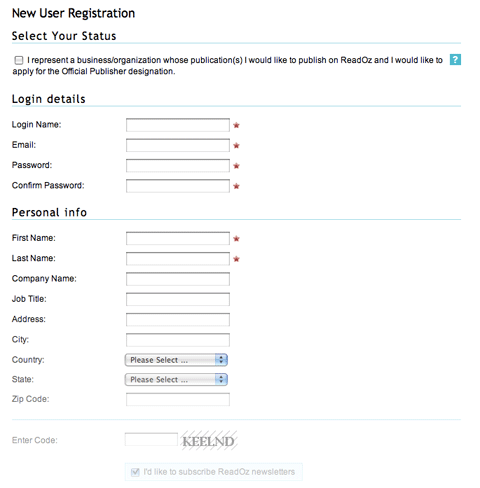
The ReadOz sign-up form is very long. On closer inspection, we find that half of the fields are optional. If they’re optional, they don’t really need to be there. Such a form would likely scare off a user seeing it for the first time. Show only what the person needs to register; the rest can be filled in later.
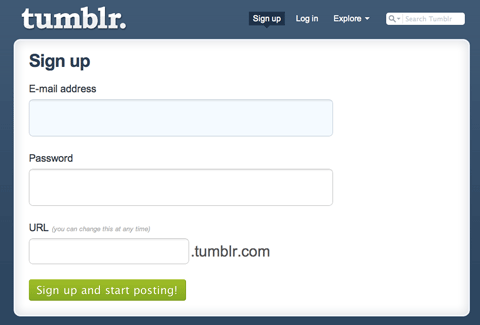
Tumblr has one of the shortest sign-up forms around. Just three fields: email, password and the URL of your new blog.
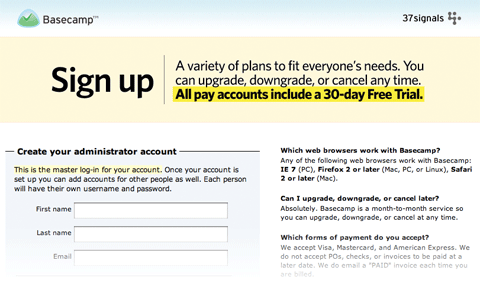
The Basecamp sign-up page has a smart trick. It has no website navigation aside from a home-page link. This keeps the user focused on the sign-up process, without any distractions or means of leaving the page.
Less Thinking
Usability is all about making things easier to use. Less thinking, less frustration. A website should do all the work and present visitors only with the things they’re looking for. Usability is also about the experience people have using your website, so attention to detail matters, as do the presentation and feel of the page.
Drop your thoughts on these and any other usability problems you run into in the comments section below! (al)





elecious
February 18th, 2009 4:38 pmseems to be an anchor problem on point 6
nice article though and a lot to consider for my portfolio
Gertjan
February 18th, 2009 4:42 pmNice post!
FireDart
February 18th, 2009 4:43 pmI really do hate when people put useless optional registration fields.
Over all great post!
Andrew Houle
February 18th, 2009 4:46 pmGreat advice and article! Thanks for this.
Brian Gottier
February 18th, 2009 5:02 pmLots of opinions. Show us more examples, please.
Rutger
February 18th, 2009 5:02 pmPssh, i don’t like getsatisfaction… it doens’t work like a forum, it’n nothing like a forum. It’s anoying and i can’t find any logical structure in it!
Dmitry
February 18th, 2009 5:15 pmRutger: I agree with you. There is something inherently confusing about the GetSatisfaction layout. I mentioned it here because it’s a popular solution, and using it, or another forum, is much better than nothing.
Narshada
February 18th, 2009 5:35 pmExcellent article with real world examples of how usability can be implemented. I particularly liked the .htaccess information. A good addition to the info in Steve Krug’s book.
wyeko
February 18th, 2009 5:43 pmgood tips
MischiefManaged
February 18th, 2009 5:54 pmreally good post, i read all of your articles
but should 6. No way to search be a really long link like it is?
cause it links to getsatisfaction
=]
Soh
February 18th, 2009 6:07 pmAll great points, thanks Dmitry~
morozgrafix
February 18th, 2009 6:07 pmVery nice article as always. I think you missed closing an anchor tag after “The GetSatisfaction forum for Apple”.
Greg
February 18th, 2009 6:41 pmThis post was difficult to scan!
- Too many different sized images which made it hard to read. I realize the nature of the post forced you to use a ton of images, but you could have taken extra measures to make the images stand out from the text. I found myself stopping and starting again and again to understand the point in relation to the pictures.
- Some of the captions weren’t centered below the image; but instead looked like they were part of the post.
- I also didn’t understand using the ‘get satisfaction’ logo, it just made me start and stop reading (again).
- You also bolded far too many sentences and words.
- You forgot to close a tag before Item 6
You attempted to be informative and authoritative…and while you made several good points; the poor layout and hard ‘scan-a-bility’ contradicted the overall message you were trying to convey.
Jack McDade
February 18th, 2009 7:03 pmSolid post. These tips need to be follow much more often.
angemy
February 18th, 2009 7:04 pmfantastic information there. Some points were obvious but it is always good to refresh your mind. thanks very much, will definitely come in handy.
zilch
February 18th, 2009 7:21 pmthanks for the post. for further reading on web usability i’d recommend Steve Krug’s “Don’t Make Me Think”
yeah
February 18th, 2009 7:33 pm10. Link tags that don’t end where they should (see #6).
Xavqior
February 18th, 2009 7:49 pmVery useful article. I am one of those guilty for using the same title throughout my entire site. Great post.
LouCyphr
February 18th, 2009 8:01 pmFor example, articles on Smashing Magazine.
Murugesan M
February 18th, 2009 8:03 pmExcellent, Thanks buddy
thienng
February 18th, 2009 8:04 pmthank your post!
Chris
February 18th, 2009 8:04 pmThe Redirect directive is part of mod_alias, not mod_rewrite; RewriteEngine on is unnecessary.
Matt
February 18th, 2009 9:35 pmExcellent article! Couldn’t agree more with this list. Thanks!
DKumar M.
February 18th, 2009 9:35 pmNice post for improving your designing skills…. Useful for everyone !!
Thanks Dmitry for your efforts.
DKumar M.
Cherice
February 18th, 2009 10:21 pmThanks for your truly thoughtful posts. What I like most about them is that you really highlight the role human psychology plays in the decision-making processes of good designers. Have you ever thought of compiling them into a hard copy primer on design for beginners? Currently, they make great “mini-textbooks” on different facets of design–especially for classes like those I teach (Spanish pedagogy) where the primary focus is not supposed to be design, and yet where a solid understanding of principles of design greatly improve students’ success in the targeted content area as well as the quality of the final products they produce.
Mr Shine
February 18th, 2009 10:52 pmThanks for this great article!
ASK Dziner
February 18th, 2009 11:07 pmgr8 article
srinivas
February 18th, 2009 11:21 pmnice article thanks
Pandjarov
February 18th, 2009 11:55 pmQuite useless article. It is so easy to point at other people’s mistakes. Why don’t you make an article titled “The errors in the Smashingmagazine web design”. You can mention that half of the website is full of ads, another quoter is filled with useless twitter facebook and doesntreallymatterthename social network gadgets…
Cito
February 19th, 2009 12:28 amI’m affraid that you forgot to close anchor tag before 6th section ;)
Great article anyway ^^
kingcole
February 19th, 2009 12:28 amGreat post, really useful!
GrammarChecker
February 19th, 2009 12:32 am“less keywords” > “fewer keywords”
Sandie Sørensen
February 19th, 2009 12:32 amNice article
- but a bit mixed message concerning SEO or usability. Perhaps it’s too difficult to split theese to phenomenons apart?
Philippe
February 19th, 2009 12:38 amThank you for the reminder. Nice article.
Pierce
February 19th, 2009 12:39 amNow that most modern browsers use tabbed browsing, surely it’s more appropriate to put the website name first in the Title tag these days. It makes it easier for users to get back to your article/page if they’ve got multiple tabs open and a limited amount of text displayed on each tab.
Snookerman
February 19th, 2009 12:43 am#5 No way to get in touch – This is really, really annoying. I experience this all the time. Usually from companies that provide me with a service which makes it likely for me to need to contact them.
Most of the times they do have an email address or a contact form. The problems is that they try to “help” you by putting a bunch of FAQ pages and robots that don’t understand you and other tips and tricks that they think will be useful and that you have to click your way through because they never really are helpful.
Another thing I hate is frequently asked questions that are not frequently asked. Many companies post their own questions that they think will improve the credibility of their products, rather than questions that users actually ask, frequently. E.g.:
Q. Is your product the best?
A. Yes, yes it is!
instead of:
Q. Why doesn’t your product work?
A. Em.. because it’s.. not the best..
ETA: Really nice feature that you can edit your posts!
krish
February 19th, 2009 12:59 amgood article, thank’s
Victor Stanciu
February 19th, 2009 1:04 amAs much as i like the Tumblr registration form, the probability of including a typo in the password field is big enough to include a “Repeat password” input. Having just one password input is a usability mistake in itself.
Quakeulf
February 19th, 2009 1:05 amI think it’s rather silly to criticise SmashingMagazine’s style and lay-out for this article. That’s just trolling it. Just turn off the style sheet of the page if the bells and whistles bother you.
The points made here are valid points, and I have to agree with them, but I also have to agree with some of the other posters that the examples are a bit so-so. Either you leave in solid examples or you leave them out altogether.
Andy
February 19th, 2009 1:11 amInformative article as always on this site.
More annoying than usability errors are the people who leave negative comments slagging off articles such as this (Greg, Pandjarov, etc.), and pointing out pendantic problems such as a missing anchor. Give the guy a break and get a life. Can we find an article that one of you have published? I think not.
carrrramba
February 19th, 2009 1:15 am@Pierce,
well, in my opinion the limited amount of text visible due to tabs makes it even more important to write a descriptive title first before your website name. Imagine you have several articles from the same website opened in different tabs. If they’d put their website name first, you would only see that name in all tabs which makes it really hard to find what you were looking for, wouldn’t it?
Pandjarov
February 19th, 2009 1:17 amOh, please this article is “slagging off” much more than I am with my humble comment here. I am sorry I didn’t post the regular “Great article”, maybe because compared to the other great stuff here it is really not great at all.
Wildman NZ
February 19th, 2009 1:19 amThoughtfull and very useful. I will copy and pass on to many clients who will not listen when I suggest similar improvements. I always add
‘KEEP THE HOME PAGE TO A SINGLE SIMPLE SCREEN’
Michael
February 19th, 2009 1:36 amNice summary
Alessandro
February 19th, 2009 2:06 amGreat article! :)
Laura
February 19th, 2009 2:11 amVery informative post. Pointing out the negative features in sites we use regularly is a great way to show examples, and help us understand why those features don’t work. It isn’t just slagging something off, it’s called constructive criticism!
More usability stuff like this, please Smashing :)
Francisco
February 19th, 2009 2:16 amGreat post and nice tips! :)
Thomas Dedericks
February 19th, 2009 2:41 amNice post. Just a remark about padded links:
a { padding: 5px; }won’t apply any vertical padding since
ais an inline tag. You’ll need to modify the rendering mode (display: inline-block;for instance), or useline-heightinstead.V1
February 19th, 2009 2:44 aminstead of using hive logic i just add allot of “j” chars in my email address and do
var email = document.getElementById(‘email’);
email.href = email.href.replace(/j/i,”);
Works like a charm to.
Laurent
February 19th, 2009 3:30 amPoint 4 .
The red circles indicate the areas where visitors tend to focus their gaze, and the numbers indicate the order in which they look at these elements.
The focus path in not the same on every website, because the design is not the same on every website.
Darren Taylor
February 19th, 2009 3:53 amPretty much common sense all of this, I’d like to have seen things like proper use of whitespace included, too often I see nice sites but with images squashed against text or no appreciation of appropriate margins and padding.
Riccardo
February 19th, 2009 4:05 amNice article Dmitry, thanks.
ryandc
February 19th, 2009 4:05 am4. Content that is difficult to scan – If only the people above me would listen to this…
Dan
February 19th, 2009 5:08 amFrankly, I would love for Smashing Magazine to do more articles on things like this, usability and human psychology for various applications, rather than CSS and HTML tips articles.
That Greg guy is also extremely anal. If you can’t focus reading the article because of pictures, you should be watching Teletubbies.
docdave
February 19th, 2009 5:43 amGreat article. I follow most of the recommendations listed, but there are a few I have overlooked lately; it’s good to have a refresher! I have added these few to the TODO list for version 2.0 of my home built CMS.
Thanks.
Nasip
February 19th, 2009 6:19 amGreat article.
Matt
February 19th, 2009 6:37 amA great refresher; absolutely spot on!
Nick Kwiatkowski
February 19th, 2009 6:52 amThe not having any contact information thing is a huge pet-peeve for me. How many websites do I go to where the contact-us form is either broken, or has a simple form that limits the feedback. Some of the worst offenders have a completely unuseable CAPTCHA that takes an hour to figure out. I am a potential customer, at least give me your phone number or email address so I can contact you.
eriwyn
February 19th, 2009 6:59 amFabulous article. Thoroughly enjoyed a post that had just as much instruction and “how-to” as it did with examples. Thank you, thank you soo much!!!
reezluv
February 19th, 2009 7:02 amGreat info!It really helpful..thanks for the great articles..:D
GregK
February 19th, 2009 7:04 amGood post.
My most annoying usability issue is “printer-friendly” pages that aren’t printer friendly. On many sites the printer-friendly pages are too wide, so the right side of the text gets clipped.
griffin
February 19th, 2009 7:08 amDon’t forget to avoid those Nightmaters.
zoey
February 19th, 2009 7:16 amNice article… I agree with Snookerman.. very true.
Jon
February 19th, 2009 7:45 amGreat post! The tiny links thing can get really frustrating, especially on a mobile device like the iPhone where you’re trying to tap the link and have to zoom in just to hit it. Pagination is also a big pet peeve of mine, especially the tutorial sites where you have 12 pages for what could be a simple 1 page tutorial.
A while back I wrote a similar article targeted towards first-time web designers about the Common Mistakes that New Web Designers Make
Chris Bird
February 19th, 2009 7:57 amAnd, IMHO, one you missed. Put the effective date of the content in the article. All pages are relevant at the time they are created, but their usefullness can degrade over time. When doing research, I really want to know the effective time period of the article (was it written at the time of the event it is describing, or later?, Does it represent the state at the time of writing )eg rate of increase of Google searches is 17% – useful if you know when and over what period.)
Youkho
February 19th, 2009 8:06 amThanks SM for this useful article
love this “It doesn’t look like Coca-Cola really wants you to contact them.”
Cathy Goodwin
February 19th, 2009 8:32 amThis article is brilliant – I just linked to it from my own copywriting blog. I am going to insist that every client read this article and also give it to anyone who helps with web design.
Dmitry
February 19th, 2009 8:36 amThanks for the comments everyone, I appreciate you taking the time to write down your thoughts.
@Chris: Thanks for the tip.
@Greg: Perhaps so, but I didn’t forget the close tag. The article goes through more than one person before it appears here, so the little error was introduces in the editing stages. I also follow the general Smashing Magazine guidelines when constructing this post, which are not the same style as I normally follow on my blog (e.g. highlighting sentences etc.). This means I may not be making best use of it, so sorry if you didn’t find the article scannable. Your feedback will help me in the future, thanks ;)
But you see, that’s the great thing about blogs. Even if you make a mistake, somebody will point it out very quickly within moments of posting — and it will of course be fixed. I think it would be a bit steep to call a closed tag a usability mistake don’t you think? Please accept my apologies for any inconveniences caused — the tag is now properly closed.
@Pandjarov: Thanks for your comment. Please don’t hesitate to post your thoughts — I don’t expect all replies to say “great article”. Constructive criticisms are much more interesting because they give you the opportunity to learn. What problems do you see in the Smashing design? What would you propose to fix them? I’ll be interested to read your thoughts.
@Pierce: That will depend on what type of site you have. Do you need to be distinguished by your site’s name in the tab, or the content? So the sites you’d ‘use’ all the time — the sites that are likely to sit in your tabs bar for long periods of time — would want the name of the site at the start. These are things like web apps: Gmail, Basecamp etc. Content heavy sites like newspapers and blogs may want it the other way round as you’d likely only use them for one or two articles at a time.
Quakeulf
February 19th, 2009 8:39 amNow it’s time for colonthree: :3
Anne
February 19th, 2009 9:04 amI’ve been preaching usability for a long time, glad to see an authoratative post from Smashing Magz. on this important, and often misunderstood & overlooked aspect of good web design and development. Kudos.
Dylan Easley
February 19th, 2009 9:23 amGreat article. I’ve been working on a new website for work (my first one) so I’m always looking for new things to learn. Thanks!
phiyo
February 19th, 2009 9:31 amGreat refresher article for myself. Never know about Enkoder and Pixlr which I can make a good use of. Thanks!
Mario
February 19th, 2009 9:35 amthanks. good tips :)
Tom
February 19th, 2009 9:35 amSome really good points to think about… great design and usuability is what clients are always looking for!
David Morin
February 19th, 2009 9:42 amGreat article once again as we tend to forget those small details that makes a whole lot of a difference. I still cannot believe when I see it but some designer or developer seems to forget about it from time to time; the contact page is most probably one of the most important feature on a website!!!!!!! I personally want to trash out my laptop when I want to get in touch with a company and there’s no f******g phone number, widget or easily to access contact page.
Brent
February 19th, 2009 9:48 amNice post but I disagree with one thing: the small links. Perhaps it’s the younger (and by younger I mean in the mid 20s) generation, but I don’t think the example you provided was a good example of small links. They weren’t that small to me at all. And give a little more credit to people with their hand-mouse coordination; people are capable of clicking on smaller things just fine.
banji
February 19th, 2009 9:55 amExcellent article !
I also think that a lot of websites are suffreing of a lack of contrast between the fond color and the background.
For example, on http://jeffcroft.com/, the top menu maroon is too close from the background color.
The most important thing in webdesign is, I think, being able to make compromises between visual beauty and usability/accessibility.
Dr. Girlfriend
February 19th, 2009 10:01 amWhat an excellent, well-written article. Well done, Dmitry. One would think these particular usability mistakes would be common sense to most web designers, but unfortunately, this isn’t the case.
Now, I’ll show everyone how to conquer your list of usability errors with my good friend Firefox and a few handy extensions:
http://www.mozilla.com/en-US/firefox/
1. Tiny clickable areas: No Squint.
Allows you to adjust the default text zoom level, and optionally remembers the level per site.
https://addons.mozilla.org/en-US/firefox/search?q=nosquint&cat=all
2. Pagination used for the wrong purpose: Repagination.
Links pages together to view all on one page.
https://addons.mozilla.org/en-US/firefox/search?q=repagination&cat=all
3. Duplicate page titles: Retitler.
Change the title of a page using regular expressions.
https://addons.mozilla.org/en-US/firefox/addon/7863
4. Content that is difficult to scan: Stylish and/or Greasemonkey.
Customizes the look of websites.
https://addons.mozilla.org/en-US/firefox/addon/2108
https://addons.mozilla.org/en-US/firefox/addon/748
5. No way to get in touch: Use Firefox to obtain contact info from Google Finance.
http://www.google.com/finance
6. No way to search: Site Search.
Search any site with one click. This extension adds an item in the right-click menu so you can select text and search the current site for it using Google. It also adds a toolbar for searching the current site or the top 100 most visited domains in your history.
https://addons.mozilla.org/en-US/firefox/addon/9506
7. Too much functionality that requires registration: 1Password (Mac only) or RoboForm (Windows). Fills in web forms with 1 click.
http://agilewebsolutions.com/products/1Password
http://www.roboform.com/
8. Old permalinks pointing nowhere: Resurrect Pages.
Searches through 5 big page cache/mirrors.
https://addons.mozilla.org/en-US/firefox/addon/2570
9. Long registration forms: Again, 1Password or RoboForm.
http://agilewebsolutions.com/products/1Password
http://www.roboform.com/
In my opinion, Firefox is the panacea that makes the horrors of the web bearable. Cheers!
Dmitry
February 19th, 2009 10:09 am@Brent: Try using Hacker News on an iPhone ;)
Webguy
February 19th, 2009 10:11 amI get frustrated with how often my users request that I implement designs or content that directly conflicts with good usability practices. I try to suggest more usable ways to accomplish their goals, but it’s seldom that they listen. They forget that it’s my job to come up with the ‘how’ … all they have to do is provide me with the ‘what’.
Shahzad Khan
February 19th, 2009 10:43 amNice article. Very actionable advice. I’m glad you wrote this up !
- Shahzad Khan
Pev
February 19th, 2009 10:46 amHey thanks for the post. I’m new to blogging and learning how to make my site better. These tips will definitely help me out a lot.
juro
February 19th, 2009 11:09 amGood list, adding to #5:
- not having any opening times
- not having an easy way to find telephone numbers
Suggestion:
If there is a do/don’t list (and it is great that you have examples for both!) – it might be easier to distinguish the two by using a thumb-up/thumb-down image or something.
bvc100x
February 19th, 2009 12:41 pmanother awesome post! it show how we design the web more clearly and beautiful… good job
mbielski
February 19th, 2009 4:12 pmMost of this should be common sense, other parts should be taught somewhere to anyone that wants to do this for a living, the rest seems to always bear repeating. Should have added #11 (somebody else beat me to #10) to the list: websites that restrict their content to tiny little column and then flood the rest with ads and other garbage. *AHEM smashingmagazine.com AHEM* I mean come ON people… we live in an age of higher resolutions and larger monitors! Get with the freaking program! Width makes your pages shorter!
Edit: Oh, look at that… I submit and the page changes widths. Time to add #12: Inconsistent layout makes people go “WTF just happened?”
Dmitry
February 19th, 2009 4:36 pm@mbielski: Actually, thinner columns of text are more readable than wide ones. Why? Because the eye has to travel less across the page, and the jumps it has to make to the next line are also shorter. This is why newspapers make use of thin columns of text.
Kate
February 19th, 2009 5:08 pmEpicurious.com does (or did, when I registered) a nice job with #9 — their very simple sign-up form takes you to a second page where you have the option to enter more information. Or not.
sloansteddi
February 19th, 2009 10:30 pmEnter the favicon! Great post, fun to read. but it makes me think… damnit, usability destroyed!
Quakeulf
February 20th, 2009 1:07 amDr. Girlfriend:
I can assume you are a zealous, trolling FF-fanatic completely shut from the outside world and trying to talk sense to you will just fall flat; but Opera does many of those without the need for plug-ins. And it runs faster.
OverZero.it
February 20th, 2009 1:08 amVERY interesting post!
Some of the advices could appear a bit obvious, but it’s not… :)
Many thanks.
LC
February 20th, 2009 3:26 amReally good article, thanks !
- tips on contact page is so obvious but so everywhere.
- about useless field in forms, why is the purpose of the “required mail that will not be published” you see here and on a lots of blogs ? (i always give mail @ mail.com)
I like the Basecamp homepage, really “restful”.
Ben Gribbin Web Design
February 20th, 2009 3:56 amGreat article, very helpful. I really hate sites that make you sign-up or register for everything. They should try a “Start using the product” before you register approach.
McMuffin
February 20th, 2009 7:25 amnice article . thanks for input
Cara Mia
February 20th, 2009 9:07 amPutting advertisements above the articles here in Smashing has confused me numerous times. If the ad was the same (which understandably it won’t be) maybe my eyes would adjust to that area and I’d ‘learn’ to look under it for the article content…. yet I keep getting fumbled up and stall for a few seconds to figure out whether how the picture between the title and the article itself is related to the article. Essentially your he ad placement between the title and article might be considered a usability mistake…? http://www.smashingmagazine.com/2009/02/18/compositio-clean-beautiful-and-free-wordpress-theme/
Dr. Girlfriend
February 20th, 2009 9:56 am@Quakeulf: Evidently, it appears that you are the troll. The title of this article is “9 Common Usability Mistakes In Web Design”. I offered some advice which other folks may find useful to combat these annoyances. You, on the other hand, tried to turn this thread into a ****-measuring contest about Firefox and Opera. If you have some helpful info to add, please do. Fwiw, I’m sorry your life is so empty you feel the need to attack complete strangers on the internet and hope things get better for you soon.
Dmitry
February 20th, 2009 10:43 am@Dr. Girlfriend: Don’t worry, maybe he’s just a little jealous of all those Firefox plugins ;-) Thanks a lot for putting that list together — very useful.
Hugo
February 20th, 2009 12:15 pmgreat points,
Thanks
Ohcyt
February 20th, 2009 12:37 pm2. Pagination used for the wrong purpose
Just a quick note: with mobile browsers, it is quite convenient to split longer articles in smaller chunks to prevent browser crashes. Especially the galleries you guys post here frequently cause frequent browser crashes on the iPhone is my experience, and it would be great if an article like this one (50 Beautiful And Creative Portfolio Designs) would be displayed on multiple pages.
Obviously splitting articles has it’s downsides, like you mention, but for some sites it could be ok to cater for the crappy mobile browsers.
By the way, this article is great, just like pretty much all other articles here. Keep it up!
THV
February 20th, 2009 1:06 pmGreat article!
It listed many frustrations that we all experience as users and offered solutions for developers.
Guidelines and insights like that help make web a better place. Thanks.
Quakeulf
February 20th, 2009 2:57 pmWell, I’m not the angry one. :3
Rob
February 20th, 2009 3:45 pmTen would be to use a bullet list instead of a number list when the value of the list elements are equal. Is your first tip the most important?
Fred
February 21st, 2009 1:13 amThis article has some good points to look out for.
One thing I’d like to know, though, is the part about user’s eye movement across websites.
we jump from one piece of content to another, from one website to the next. People tend not to read websites top to bottom; they start reading whatever pops out at them first, and then move to the next thing that captures their interest.
Jacob Nielsen found quite a different pattern: He called it the F-Shape.
It’s not my intention to critize or say you’re wrong, I’m just wondering where you take this information from. I’d appreciate an answer.
Cheers. :)
D. A. Shaver
February 21st, 2009 7:34 amThese are some great ideas. I think I will add #1 to my all my site wide style sheets so all links on the web site have padding.
Vadim P.
February 21st, 2009 10:15 amTotally agreed with the first point (github.com fails hard on this, and that’s one of the reasons I dislike it), and the getsatisfaction registration issue.
BigBuddy
February 22nd, 2009 8:25 amThis is a great resource for me as a designer, but also as a handy guide for clients to read.
Dmitry
February 22nd, 2009 11:32 amFred: When I meant top to bottom I meant it literally — read the whole page from top to bottom :) Yes, you would generally start at the top and make your way down, but as you can see in Nielsen’s study, people won’t actually read very much, instead they’ll grab small chunks of info, and if it doesn’t interest them they’ll move to the next bit that catches their eye.
The sites in his examples are text heavy, which leads to the F pattern (since we read left to right, top to bottom). If the page consists of a bunch of marketing elements instead of a lot of text (e.g. Basecamp site in my example) then you’ll be jumping in a more random order because the content is spread out a lot more and there are more pictures. His recommendations are the same however: each of the focus points should contain little information heavy chunks that you can digest very quickly. My diagram shows a path a user might follow, but it would be different for each person. There’s a chapter on this in Steve Krug’s book “Don’t Make Me Think” (actually, here it is online as a sample chapter)
gr8pixel
February 22nd, 2009 7:50 pmVery useful indeed! Thanks.
Web Design Creatives
February 22nd, 2009 8:58 pmA lot of common points covered very nicely through this article, nice!
Priyanka D
February 22nd, 2009 10:16 pmNice article.
We at DeskAway use get satisfaction; glad to read abt it here.
We also use Zendesk to enhance our customer support! I wonder what you think about that.
Vinoth Kannan
February 23rd, 2009 4:19 amReally helpful to us.
Nice post, thanks for those who post this..
Mike@ssm
February 23rd, 2009 5:02 am#10 Choosing excessive S.E.O over your audience.
rKwehtoe
February 23rd, 2009 2:26 pmIs the “Back to top” link dead?
I have a long ways back to the top of this page.
But overall, great read/tips. Thanks.
Ryan R.
February 23rd, 2009 7:50 pmNice tips – point #2 specifically pisses me off a lot. I run into it all the time and I hate the sites that do it. The worst are top 20, 10, etc. lists that put each item on a separate page.
John
February 24th, 2009 3:31 pmgreat article, I’d shurely need to remember those good advices !
Brant Schroeder
February 25th, 2009 1:08 pmExcellent information. I come across a lot of this when I am consulting or redesigning websites.
Jerome
February 25th, 2009 2:50 pmNo contact form nor phone number is sometimes MEANT TO in big companies websites… sadly.
Drew
February 26th, 2009 7:36 amYou guys will love this:
I work for a company who have a huge CMS website. It is filled with bad site architecture for starters, but also includes 6 out of these 9 problems.
The front page looks like someone dumped a barrel of letters and links all over it. There are 5 or 6 flash ads screaming for your attention, the search engine provides almost nothing relevant(seems to rank items based on sales, and not the keywords entered).
And the worst of all is the page titles which have the company name, company name blog, archives, then the title -and this is for hundreds of blogs, all of which don’t show up in googles first 5 pages.
last year they ‘re -launched’ the website with the same architecture, same crap search engine, but this time with a white background and pretty artsy photos and fonts. Hmm wonder why we are still not selling anything?
The company is loosing money everyday and I’ve pointed these things out to anyone who will listen and no one will. In fact they just ‘let go’ of about 30 employees because of the recession. The only thing left I can do is go straight to the web team, who of course will feel threatened and wont listen either because no one wants to accept that the best they can do isn’t good enough -especially from someone who isn’t a web designer.
We could seriously achieve the same result with our 40 grand web site by simply putting up a jpeg of a banana and a link to our competitor(s). At least people would know what they’re looking at.
I feel bad for the next batch of employees that get fired because all of this is 100% fixable.
KooWii
February 27th, 2009 4:41 pmI do agree that if readers need to log in to comment, then your blog will have less than 10 comments. It is really true because I myself doesn’t like the feature.
Ludonara
February 28th, 2009 8:21 amgood article !
Bill Beavers
February 28th, 2009 10:43 amGreat article. I’ve known for a while that my site had too much copy. Now I have some idea what to do about it. Thanks so much for the information.
Alex
February 28th, 2009 1:08 pmi agree with the comment on readoz.com posted on 18th – valid point! a lot of fields are useless…site says that it is BETA vsersion and i found loads of cool things – reader is the best i have ever seen, lots of free content…i will bookmark this one!
Emily Lozano
March 3rd, 2009 9:09 amGreat article. I would like to add that if I need a password to sign up or login i want to know UPFRONT how many characters that password should be along with any other rules. It’s extremely frustrating esp since I ask my browser to remember the password – if I miss the mark my browser has to remember two passwords and now I have to remember which one is correct. fail.
Carlo I.
March 4th, 2009 12:06 amAbsolutely informative! Thanks for sharing!
lee
March 7th, 2009 4:20 pmI don’t agree with 1 at all, well from the pictures you used to show it. On a forum for example, a small piece of text which says (new post) and takes you to the newest post. That saves me scrolling down the page and i use it allot. Also comments, instead of just saying 18 comments in a post, if you put a link in that, its just adding that little bit of usability. They need to be small or they would be annoying.
Bev Whitsel
March 11th, 2009 5:49 pmAm I correct, Get Satisfaction was used as an example of both a usability mistake and a solution to a mistake? This was a good article. I need to change my page titles…web site name at the end of the title. I’ve read books and articles on web usability and this is the first time I’ve seen this suggestion. thanks.
miketrix
April 7th, 2009 6:24 amGreat and useful article!
shane
April 8th, 2009 3:36 amThis was a good article. I need to change my page titles…web site name at the end of the title. I’ve read books and articles on web usability and this is the first time I’ve seen this suggestion. thanks.
Aaron Smith
April 15th, 2009 4:29 amGreat Post! Keeping the visitor focused is vital to every design. I too have clients with long forms, but sometimes they just require more data. Love this post, very informative.
cathleen
April 15th, 2009 9:24 ampriceless
Jay Squared
April 25th, 2009 1:29 pmGreat post!
beli
July 14th, 2009 11:19 amThis article is very good. I try some of those tips in my next project.
ffaffy
August 8th, 2009 12:20 pmfax number is the only truly required field.
All the the other fields bow to fax number.
FYI: I almost didn’t leave this comment because Name was required.
http://twitter.com/ffaffy
Joe at Overit Media
September 24th, 2009 8:36 amSome follow-up advice on titles:
See the Smashing Magazine example (page title)? The title uses only 8 words. Keep the title between 6-12 words and if you’re shooting to get the full title (without being cut off) in a search result, try to keep it to 65-70 characters.
That same reasoning should be attributed to keeping things simple and quickly consumable for your visitors. A lengthy title looks messy and consumes a visitors time to read and absorb. Be succinct and descriptive for both your visitor and the search engines.
Also – with SEO in mind, don’t cannibalize the KW/phrase you are looking to rank for. In other words, if you continually use the same phrase and/or use the same phrase in the same position of the title, page after page, the weight of that phrase is diminished, especially for the page you’d like to rank well for in the SERPs.
ruthlessmind
October 7th, 2009 7:43 amContent that’s difficult to scan should be at the top of this list.
While all the little details make a big difference, good usuability begins with meaningful, concise content that’s well-structured. Many clients (and some designers) want to fill the page with links, lists, widgets and other miscellaneous content in the name of cross marketing. While it’s a good practice to promote the whole site throughout the user experience, content for content’s sake is often confusing and adds clutter.
Keep it focused. Make it meaningful. Make it easy.
My personal #2 is “No way to get in touch.” If people click on “Contact Us” it’s because, you know, they want to actually contact somebody. Not because they want a FAQ list or a questionnaire.
Audrius
October 19th, 2009 3:37 am2. Pagination used for the wrong purpose
Content pagination useful if you need to measure what parts of article are read.
Polly
January 8th, 2010 3:07 pmReally helpful article! Thanks!
Kelley Thompson
February 5th, 2010 6:41 amUsability Mistake #10 –
When you provide a link to content on another website or to a .PDF document, be sure the link is coded to open up external content in a separate window. This used to be a standard practice (website stickiness), but I notice more and more designers are getting away from it. Most users click a link to a .PDF or content in another website in order to view the contents, then close the window to resume viewing the website they were on in the first place.
How frustrating to discover you’ve just closed the website you were viewing!
milf threesome
April 18th, 2010 11:14 pmNo ifs, ands or buts.
Guido Tapia
May 18th, 2010 5:24 pmI think the biggest usability mistake is to make usability decisions based on speculation. Now days there are great tools and techniques that help you make informed decisions on usability. Tools like split testing (AB testing) heat maps (like picnet.com.au/met) and other analytics products. Usability theory only goes so far and may not even apply in some verticals.
Nataly
June 1st, 2010 2:52 amA lot information to improve my own web design skills in webassiststudio.com. You did a great work!
Gerard Martin
June 21st, 2010 6:35 pmImproving the customer experience should be a primary consideration in creating websites. I liked the suggestions that you posted since they limit the barriers of interaction between the site owner and the visitor.
Similarly our company considered the same thing when we launched our website with the help of a web development (Toronto) company. We carefully selected the necessary information and made icons that are easy to click so the site visitor can check the information right away. A (Toronto) web developer regularly updates the site to remove dead links and add additional information. We would definitely incorporate the tips that you gave in our next site update. Thanks!
Nikunj Bhatt
August 12th, 2010 6:20 amvery nice article and many has provided good opinions
@Kelley Thompson
I agree with u. it is very frustrating when you open a link targeting to a document or image or another website and it replaces the contents of the current tab/window of the browser.
Sometimes it is also important to provide a new blank page target for the links which link to webpages in the current domain, for example, users’ profiles and search result links.
Also some sites put javascript to open a normal webpage, for example: statebankofindia.com. this must also be avoided. it irritates users by not opening a new tab/window when users middle-click on links and thus preventing browsing different contents at the same time.
btw, when i was reading the comments, i found some comments which are pointing out that “a tag is not closed after #5 / #6″. I looked around these topics for 5-6 times to find if there is really any problem!! But after search-&-not-found, i left exercise and continue reading down-ahead other comments; and then I found at comment #68 that it has been fixed!!! Some work-round is needed for this… [ i think u should put a box after #5 saying "here was a tag-close-problem", but now it is solved, so don't bother, continue reading ] :)
Lindsay
September 15th, 2010 10:29 amWhat a useful article! The map of how users scan a web page is really handy. I’m going to show the section about too much functionality to one of my clients that has his blog on lock down. Thanks for the tips!
Tez
September 20th, 2010 10:46 pmGreat article with good suggestion and advice.Thank you.
Paul naybour
October 2nd, 2010 10:04 amI think we have made many of these mistakes in our first web site, the duplicate titles and collecting too much user registration information are too easily done. However we were launching a new company and had to get something up fast. We plan a redevelopment starting next month and world welcome feedback. we are at parallelprojecttraining.com
Emo
October 10th, 2010 1:48 pmI really think so too:P I have been poking around the web for some time this week, and its kinda hard to find anything good to read on blogs:P Maybe its because there are too many of them around =) But this site actually keeps catching my attention=) Great stories, and kawai design ^__^. Ill be sure to give it more time from now on =P
Crixia Zinnia
December 15th, 2010 8:12 pmThis is Great! It is very informative. I got a lot of tips. I love all the screen shots. It helps me understand everything especially I am just starting to learn about website design. Thank you.