10 Useful Web Application Interface Techniques

More and more applications these days are migrating to the Web. Without platform constraints or installation requirements, the software-as-a-service model looks very attractive. Web application interface design is, at its core, Web design; however, its focus is mainly on function. To compete with desktop applications, Web apps must offer simple, intuitive and responsive user interfaces that let their users get things done with less effort and time.
In the past we didn’t cover web applications the way we should and now it’s time to take a closer look at some useful techniques and design solutions that make web-applications more user-friendly and more beautiful. This article presents the first part of our extensive research on design patterns and useful design solutions in modern web applications. Below you’ll find a collection of 10 useful interface design techniques and best practices used in many successful web-applications.
Please feel free to suggest further ideas, approaches and coding solutions in the comments to this post. The second part of our research will be published soon: stay tuned via RSS
and Twitter
.
You may want to take a look at the following related articles:
- 5 Useful Coding Solutions For Designers and Developers
- 10 Useful Techniques To Improve Your User Interface Designs
- 10 Principles Of Effective Design
- Five More Principle Of Effective Design
- Getting Creative With Transparency In Web Design
1. Interface elements on demand
Simplicity is important in user interface design. The more controls you display on the screen at any time, the more time your users will have to spend figuring out how to use your interface. When there is less choice, the available functions become more apparent and are easier to scan. Simplifying an interface isn’t easy though, especially if you don’t want to limit the app’s functionality.
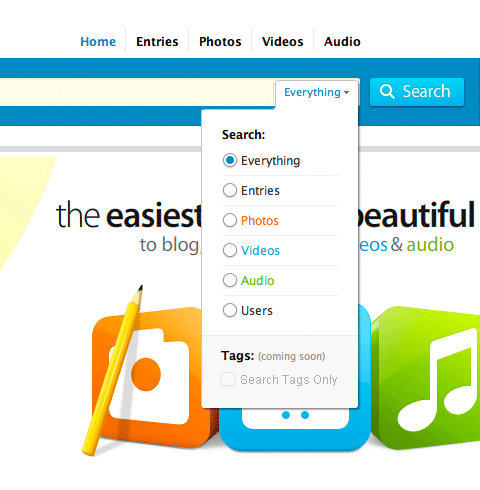
When you click on the search link in Kontain’s search box, a similar drop-down menu appears. So, if you need to narrow your search, you can use the menu to select the sort of content you’re looking for. Tucking these options away simplifies the search box.
One way of making things simpler is to hide or conceal advanced functionality. Find out the most commonly used functions of your interface and tuck away the rest. You can do this with pop-up menus and controls, which are very common on desktop software. For example, if your search bar has advanced filters, put them away in a special drop-down menu at the end. If users need those filters, they can enable them with just a couple of clicks. Deciding what to keep and what to conceal isn’t a simple task, though, and will depend on how important and how frequently used each of the controls is.
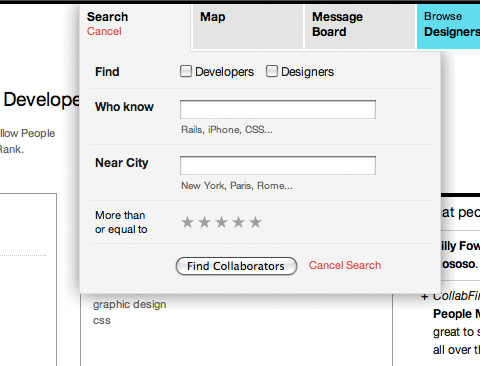
When you click on the search link in CollabFinder, you aren’t taken to a different page. Instead, the search box controls drop down, allowing you to begin your search straight away.
2. Specialized controls
It’s important to select the right interface controls for the situation. Different situations can be handled in different ways, and certain controls are better at their intended task than others.
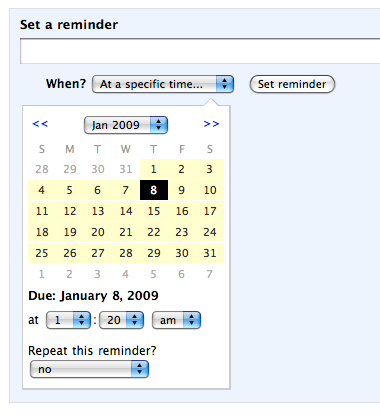
Backpack has a compact calendar date and time picker for selecting a reminder date.
For example, you can select a date by using drop-down lists for day, month and year. Drop-downs aren’t very efficient, however, when compared to a calendar picker, where you can click directly on a day you want. Calendar pickers also help you see the days, weeks and months (and especially workdays and weekends) more easily and so allow you to make a more informed decision more quickly than you would with a simple drop-down list.

![]()
MyBankTracker’s APY calculator features easy-to-use slider controls for quickly trying out different projections.
Another good example of this are sliders. Yes, you can always input a number manually, but for certain situations, slider controls do a much better job. Not only are they easy to use — just click and drag — but you can also see how your selection fits between the minimum and maximum of an available range.
3. Disable pressed buttons
One of the problems Web applications encounters with forms is the submission process. With very simple forms, if you click the “Submit” button twice or more very quickly, the form will be submitted two or more times. This is obviously problematic because it will create duplicates of the same item. Preventing duplicate submissions isn’t very hard, and it is essential to do this for most Web apps.
There are two tiers to this safeguard: client-side and server-side. We won’t go through the server-side safeguard here because this will vary depending on the programming language you use and your back-end architecture. What you should essentially do is put in a check to ensure during the processing stage that whatever is being submitted is not a duplicate, and if it is to block it.
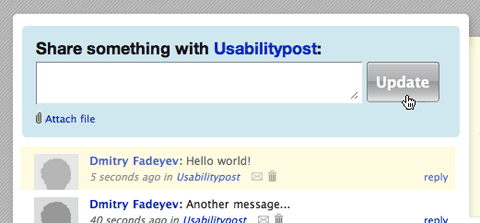
Yammer disables the “Update” button while your new message is being submitted.
The client-side stage is much simpler. All you have to do is disable the “Submit” button the very moment it is clicked. The easiest way to do this is to add a piece of JavaScript to the “Submit” button like this:
<input type="submit" value="Submit" onclick="this.disabled=true" />
Of course, we would advise you to also implement server-side checks to be sure that duplicates don’t get through.
4. Shadows around modal windows
Drop shadows around pop-up menus and windows aren’t just eye candy. They help the menu or window stand out from the background by reinforcing its dimensions. They also block out the noise of the content beneath the window by darkening the area around it with a shadow.
This technique hat its roots in traditional desktop applications and helps the user to focus his/her attention on the appearing window. Since most modal windows aren’t as easy to distinguish from the main content as in desktop applications, shadows help them to appear closer to readers, because the window appears to be three-dimensional and lay above the rest of the page.
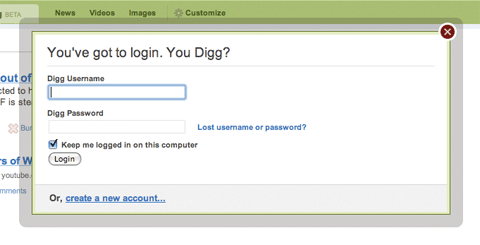
Digg’s log-in window has a thick shadow around it to block out the noise of the page beneath.
To achieve this effect, designers often create a container with a transparent PNG-image as background and place the content inside the container – with equidistant padding on all sides of the box. Another option is to use a background image with transparent borders and position the content box within this box using absolute positioning. This is exactly what Digg does — this is the image they are using (dialog.png). And this is the markup and CSS-style they are using:
(X)HTML:
<div id="container">
<div style="display: block; top: 236px; opacity: 1;" class="dialog">
<div class="body">
<div class="content">
...
</div>
</div>
</div>
</div>
CSS:
.dialog {
position: absolute;
left: 50%;
margin-left: -315px;
width: 630px;
z-index: 100001;
}
.dialog .body {
background: url(/img/dialog.png) 0 0; /* semi-transparent .png image */
padding: 40px 13px 10px 40px;
}
Alternatively, you can also use JavaScript-based lightboxes or drop shadows using CSS3-attributes we’ve described earlier, but you need to be aware that Internet Explorer won’t support them.
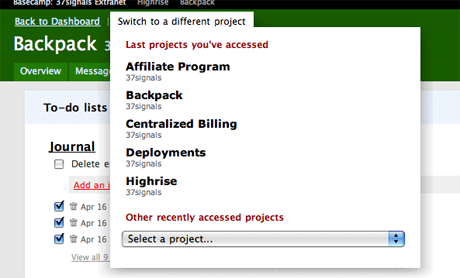
Basecamp’s project switcher window has a large soft drop shadow that helps the menu area stand out.
5. Empty states that tell you what to do
When you’re designing a Web application, it’s important not only to test it with sample data, but to ensure that it looks good and is helpful when there is nothing there yet. You should design the empty states.
When there is no information for a page or query yet, a helpful message telling the user how to start could go in that empty space. For example, a project management application’s home page may list the user’s projects, but if there are no projects yet, you could provide a link to the project creation page. Even if there is already a button to do that on the page, an extra bit of help doesn’t hurt.

Campaign Monitor points you in the right direction when you start building an email campaign.
This technique encourages users to actually try out the service and proceed directly with using the service after registration. Guiding the user through single steps of the application may help him or her to understand what advantages the application offers and if it’s useful or not. It is also important to present most important options to the users and only them — it doesn’t make sense to overflood them with numerous options. Keep in mind that users usually want to get a more or less concrete idea of what is offered to them, but they don’t want to jump into details — they have neither time nor interest in it.
Using empty states to motivate users and animate actions, you can significantly reduce the amount of “drop-outs” and help your potential clients to gain a better understanding of how the system works.
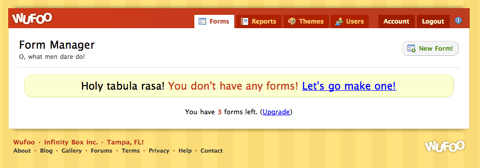
Wufoo’s forms page has a large, friendly message inviting you to create a new form if none yet exist.
6. Pressed button states
Many Web applications have custom-styled buttons. These are anchors or input buttons that have custom images assigned as their backgrounds. The default input buttons may not be suitable in some cases, and the text links are sometimes too subtle. The challenge is, when you make your links look like buttons, they should act like buttons — and this includes having a “pressed” look when the user clicks on them.
This isn’t a purely visual tweak. Giving instant feedback to the user will make the application feel more responsive and bring the experience closer to what the user experiences on desktop applications.
You can add a pressed button state with CSS by styling the active pseudo-class of the link in question. So for example, if your anchor has the class add_task_button, you can style its active class by targeting add_task_button:active.
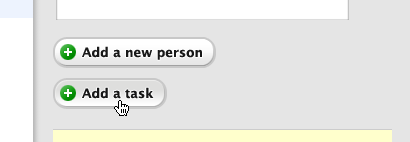
Buttons in Highrise actually show a pressed state when you click on them, providing the user with a satisfying responsive feel.
7. Link to the sign-up page from the log-in page
Some people who haven’t yet signed up to your application will inevitably end up on the log-in page. They likely want to try out your application but can’t find the registration page in a hurry. Perhaps they’ve tried accessing a feature that’s only available to registered users.
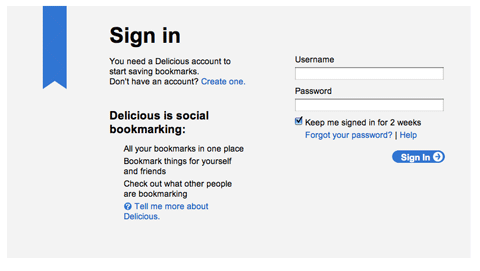
Don’t have a Delicious account? No problem; a sign-up link is provided on the Delicious log-in page.
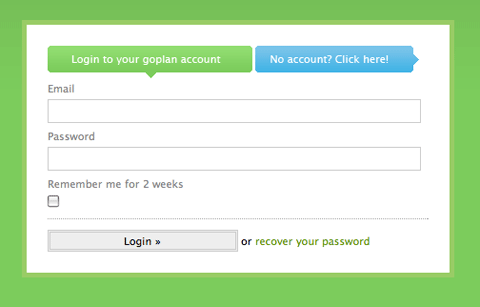
Goplan has a nice colored button on the log-in page pointing to the sign-up page.
Make things easy for these folks by placing a registration link on your log-in pages. If they haven’t got an account yet, they shouldn’t have to look for a registration page. Our studies confirm: 18% have a sign-in form or a link to the sign-in form placed next to it (e.g. YouTube, Reddit, Digg, Lulu, Metacafe).
8. Context-sensitive navigation
It’s important to think about what the user expects to see and what they need in every given context. You don’t need to display the same navigation controls everywhere because users simply may not need them in every situation.
One of the best examples of context-sensitive controls is the recent change in the Microsoft Office 2007 interface, in which the default set of toolbars was replaced by ribbon controls. Each tab on the ribbon holds different controls relating to a particular activity, be it editing graphs, proofreading or simply writing. Web applications can also benefit from such context-sensitive controls because these controls help unclutter interfaces by showing only what the user needs, not everything that’s available.

Lighthouse features a familiar tabbed navigation menu; however, it also has a second level of menus right under the set of tabs. This level displays only the items associated with the active section of the website.
9. More emphasis on key functions
Not all controls hold the same importance. For example, on a screen for creating a new item, you may have two buttons: “Create” and “Cancel.” The “Create” link is more important because that’s what the user will be doing most of the time. Only rarely will they need to cancel the screen. So if these controls are located side by side, you may not want to give both the same emphasis.

The “Create ticket” button in Lighthouse. You can see the “cancel” link next to it, in plain text. The button not only commands more importance but also has a larger clickable area and is easier to spot because of its frame.
To shift emphasis to the “Create” link, we can simply use different styles or types of controls. Some applications use the form input button for the create action, and have the cancel action as a text anchor. This not only gives the create button more clickable area, it also helps to grab the users gaze better when they’re looking for it.
10. Embedded video
While pictures and text are a great way to communicate and teach your users about your app’s features, video can be an even better alternative if you have the resources to produce it. Video has been gaining popularity on the Web in recent years. For Web apps, videos are generally used on the marketing website as a kind of screencast to show off a product’s features; however, this isn’t the only way to use video.
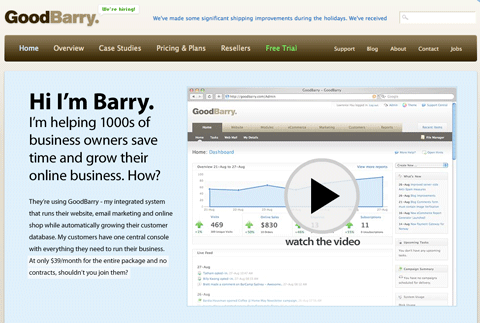
GoodBarry features a video screencast on its front page showing off the product. It also uses screencasts inside the app to teach people on how to get started.
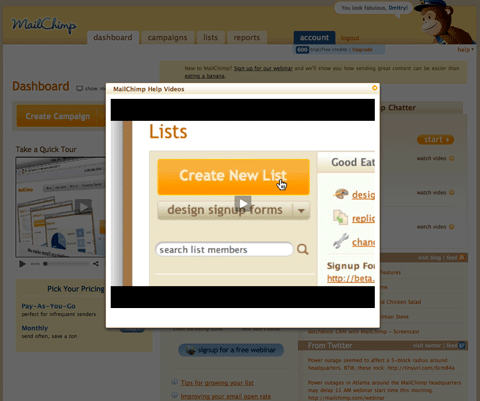
MailChimp includes tutorial videos right on the admin panel to help out new users.
Some Web apps use video inside the application itself to teach users how to use certain features. Video is a fantastic way to quickly demonstrate how your product can be used, because it is easier to consume than a page of text, and it is also much clearer because the viewer can see exactly what to do.
Related articles
Please take a look at the following related articles:
- 5 Useful Coding Solutions For Designers and Developers
- 10 Useful Techniques To Improve Your User Interface Designs
- 10 Principles Of Effective Design
- Five More Principle Of Effective Design
- Getting Creative With Transparency In Web Design
Discuss further techniques in comments!
Please feel free to suggest further ideas, approaches and coding solutions in the comments to this post. (al)


Trond
January 12th, 2009 8:24 pmThanks for the tips !:)
Jhay
January 12th, 2009 8:28 pmGreat sutff! Keep up the good work!
Mario Zuany
January 12th, 2009 8:30 pmGreat article. The pressed button state is one of that little things that improves the user experience, the feedback for virtual actions.
zabogar
January 12th, 2009 8:36 pmcool,,
nice articles…
Nouman Saleem
January 12th, 2009 9:01 pmbookmarked for upcoming site reference :}
Kyle
January 12th, 2009 9:24 pmGood article, until you featured Lighthouse as an example of good UI. Lighthouse has got to be one of the hardest-to-use apps I’ve come across recently.
Other than that, well done. I like the examples of search UIs.
gaurav
January 12th, 2009 9:47 pmultimate .. disabled submit button tip was very handy
Troy Malone
January 12th, 2009 10:17 pmGreat tips. I am always looking for ways to make our application more intuitive. It always surprises me to see 37 Signals products highlighted for good design. They have great “elements” but the complete apps are usually not that great. I guess each to his own!
Jennifer Farley
January 12th, 2009 10:25 pmVery good collection. Interface design for web apps is something I would like to get more involved in and have been reading a few books, but I think this is a very clear overview and very helpful.
Shuja Shabandri
January 12th, 2009 10:30 pmI love sliders, but having a small text field next to it as an alternative would help those using the devices like iPhone. Or at least alternative control should be enabled using browser detection.
Noam
January 12th, 2009 11:05 pmLoved it.
Sash
January 12th, 2009 11:38 pmGreat post, always looking for well designed apps for inspiration, bookmarks set accordingly
R. Sebastian
January 13th, 2009 12:13 amThanks for the tips!
PomCompot
January 13th, 2009 12:29 amAnother great one. Thanks guys.
DomSparks
January 13th, 2009 12:35 amGreat article. One thing I would add to Item 7 is that Sign Up & Signin Screens should clearly display information about the security used on the site, or should link to page that carries such info. Increasingly often sites (such as facebook, friendfeed, twitter) have unsecured main pages that show no browser padlock. Yes, they have a secure login form, but we are slowly slipping towards forgetting about the padlock because the high profile sites don’t have them. Other sites should really be secure, but there is a proliferation of (particularly startup) sites that are not. Putting info about the security employed on a page is likely to improve the level of trust that end users have in your site; it makes it different from the insecure sites… more about trust and secure-logins…
Bart
January 13th, 2009 12:37 amVery useful information! Keep up the good work!
Shuuun
January 13th, 2009 12:46 amOh jeah, i love thoose “insider” or “professionell” tips!
Jordan Moore
January 13th, 2009 12:52 amAwesome article, some very useful stuff here for taking useful web apps even further.
Natrium
January 13th, 2009 1:25 amvery interesting and satisfying article! This is the stuff that I visit SM for!
mcfee
January 13th, 2009 2:23 amSuperb post!
Bilal Ahmed
January 13th, 2009 2:47 amthats amazing
Julian
January 13th, 2009 3:24 am“Interface elements on demand” is just bad bad bad. How does the user know what’s available? He does not! The user first has to check out everything to know where the functions are. That’s why such flyout things are bad. You can’t glance over a page and see everything.
Jake
May 18th, 2010 8:12 amJulian- In some cases I would agree, but certainly not in all cases. With sites whose users typically visit repeatedly (email sites, online bill pay, etc), on demand elements are quite useful in keeping a clean interface while providing easy access to lots of functionality.
Thanks for the article!
francisco
January 13th, 2009 3:54 amvery instructive post, thanks!
Marc
January 13th, 2009 4:01 amLiked the look of Kontain’s site until I realised the whole site is written using flash. Nice ideas however most of the site could be recreated using JQuery.
Mindaugas B.
January 13th, 2009 4:09 amVery useful post. Thanks, smashing!
cnara
January 13th, 2009 4:10 amWOW! Thank you for the article.
WoollyMittens.nl
January 13th, 2009 4:28 amPlease… when you implement all this eye-candy, make sure that your page remains accessible: http://www.w3.org/WAI/
Jason West
January 13th, 2009 4:50 amWow, well done. Excellent apps dude!
http://www.privacy-web.us.tc
Ivy Clark
January 13th, 2009 5:37 amNice article suitable for the novice as well as the more experienced. A few possible additions:
- simple and clear instructions
- context sensitive help
- breaking complex tasks into smaller steps
Barry Chapman
January 13th, 2009 5:50 amIn response to #3:
Disabling the submit button in that manner will prevent the form from even being submitted. The best practice would be to call a handler function that will perform the following: (as an example)
1. var form = document.getElementById(“formname”);
2. form.submit.disabled=’true’;
3. form.submit();
This syntax may not be completely correct, so please do not critique it – I am merely showing best practice!
gabriel
January 13th, 2009 6:12 amfuck on demand interface.
that just slows down the user. only good hint here that are still not common sense is #5.
Timothy
January 13th, 2009 6:22 amAwesome! Very good collection of information. Thanks
Scott deVries
January 13th, 2009 6:27 amSome good tips here!
Dennis Tobar
January 13th, 2009 7:07 amGood tips… thanks for inspiration :)
Won Shim
January 13th, 2009 7:23 amExcellent article… Thanks!
Liza
January 13th, 2009 7:50 amThis article is very informative and interesting. Really good tips!
Brenley Dueck
January 13th, 2009 7:56 amNice Tips! Interface design is a key part to a website
-Brenelz
jurica
January 13th, 2009 9:34 amWell I am great fan of smashingmagazin, but this article really suprised me lol.
Check out this link Who ripped who?
DavidE
January 13th, 2009 9:49 amI like having a signup link in the login form. One thing I do not like is sites where the assumption is that if you aren’t logged in, you aren’t signed up. That is, they give you a signup sheet with a link to the login page. This is frustrating for existing users.
Ricardo Sousa
January 13th, 2009 9:55 amGreat article as you get us used to :)
Navdeep
January 13th, 2009 9:57 amVery well explained and presented. #4 I have used in one of my designs here http://sourcen.accept-ideas.com [do a search for "test"]
Morgan Currie
January 13th, 2009 11:17 amTo make the submit button disabling trick work in Safari 3, I had to add ‘submit()’ to the onclick, so it looks like this: onclick=’this.disabled=true;submit()’
Vasily
January 13th, 2009 11:27 amWell done! Most informative. Keep ‘em coming!
Dmitry
January 13th, 2009 12:37 pmThanks for the positive comments everyone, I’m glad you liked the article.
Thanks for the pointers Barry and Morgan. I must confess, Javascript isn’t one of my strengths :)
Julian: Regarding hiding elements in point 1. This is tricky because if you don’t hide elements, then you’re at risk of showing too much stuff on the screen at the same time. Putting too many things on the same plate will make it difficult to swallow. The more controls and options you have, the longer people will spend figuring out what to do and finding what they need. If they spend too long, they’ll get frustrated.
Simplicity is achieved through thoughtful reduction, so if some controls aren’t used very often, it may be worth tucking them away somewhere. Because javascript is used to reveal them, they’re only a click away though, so you’re not going to lose much functionality. At the same time, you’ll get a simpler and cleaner interface. Deciding what to hide and what to keep is your task as the designer :)
Jennifer
January 13th, 2009 12:37 pmBookmarked! What a good array of techniques!
Manuel Bertelli
January 13th, 2009 12:45 pmNice tips!!! Tks!!!!
aQuib
January 13th, 2009 1:16 pmGreat article. Very useful informaiton.
Artistic AutonomyArtistic Autonomy
Ben Rowe
January 13th, 2009 3:27 pmIt’s posts like these that make smashingmag my all time favourite blog
ngocluu
January 13th, 2009 6:25 pmvery useful post!
Anoop
January 13th, 2009 9:36 pmuseful post, thnx.
PropertyInvestor
January 13th, 2009 10:17 pmI like the Streetfolio.com interface. Once in the app, you can flick between properties really easily and the cashflow tool has a ‘view last 20′ entries option! Simple, but v cool!!
Erik
January 13th, 2009 10:50 pmThanks for the tips!
Here are some more :
- no scrollbars within scrollbars (youtube…)
- don’t scroll your navigation away
- put the same button at the same place every time
- put the active button on the left, cancel next to it, then the rest
- enter submits, esc cancels (onkey event)
Ram
January 13th, 2009 11:03 pmThanks for this info.
Simple things that help tremendously… :)
otustata
January 14th, 2009 1:00 amBrilliant article, thank you! Especially loving the kontain search box, good one!
Caroline Jarrett
January 14th, 2009 2:55 amit’s great to see tips that are looking at the details of user experience, particularly for forms.
I don’t agree with the follow-up comment about putting buttons in a particular order: it’s a bit more complicated than that. See my article: Buttons on forms: what to call them and where to put them http://www.usabilitynews.com/news/article4984.asp
Antonio Wells
January 14th, 2009 5:09 amThis was awesome, I’ve been looking for a non JavaScript intense way to disable a click button while the page was processing.
Alexei
January 14th, 2009 5:38 amA nice list of some helpful tips, except for disabling buttons using the inline onclick attribute. ;)
@Antonio- this is a JavaScript solution. You only write your code as the attribute’s value.
Farid Hadi
January 14th, 2009 6:01 amGreat article. Love the topic!
Thank you Dmitry and Smashing Magazine.
adwin wijaya
January 14th, 2009 6:04 amHi .. I like that backpack date and time picker.
how do i get that free on for jquery :)
any idea ? :)
Alan8
January 14th, 2009 6:56 amThe “Empty states that tell you what to do” tip is great, and is also a good idea for traditional apps.
ooeygui
January 14th, 2009 7:07 amvery good tips, I would say the admin of this site should pay some attention and look into using less advertising space, more than half of this page has nothing to do with the article!!!!!!
Benjamin
January 14th, 2009 8:52 amWoW! Thanks a lot for all those techniques ! Bookmarked for later!
Ashutosh Sharma
January 14th, 2009 9:06 amgreat stuff! really good tips! thanks.
income secrets
January 14th, 2009 10:49 amHi,
Good post here. Just like others i have gone through.
I must say you really have something going on here.
Useful stuff really. Keep up the good work.
Guess I’m going to come around more frequently.
Keep the fire burning.
Income secrets Online
pfers
January 14th, 2009 1:07 pmThnx Smashing… Great and usefull TIPS!
Shaun
January 14th, 2009 2:51 pmFantastic article. Love you work. :)
elevationSnob
January 14th, 2009 3:56 pmInterface elements on demand? Nooooooo!!! When you hide the features a user uses least frequently, you instantly make it difficult for them to find them — since they are infrequently used, the user often forgets where they are, and then has a nightmarish time finding them. Just say noooooo!
Nims
January 14th, 2009 7:37 pmgreat stuff! really good tips! thanks.
hash
January 14th, 2009 9:50 pmnice tips.good reasoning.
Jim Hanifen
January 15th, 2009 8:25 amThe very simply fix for submit buttons is great, I will be using this all the time now. Thanks SM
Simon
January 15th, 2009 11:01 pmI love these UI articles. THIS is what Smashing should focus on! love you guys.
I saw quite a cool use of video on a website: video header site
thanks again! Simon
Kalle
January 16th, 2009 5:06 am9. More emphasis on key functions – the example with button and link
It’s not so much importance factor as protocol factor. The button in this example send’s the form by http POST request and cancel-link goes directly to different page by http GET request, and the element to be used is told in HTML specifications
andrew
January 16th, 2009 12:20 pmi love sites that don’t send you to a login page but have the login/register control fly out when clicked. i’m still waiting for dotnetnuke 5 to mature a bit more–we finally get to play with jquery! that’ll go a long way towards being able to build the items on the list.
Shaker
January 16th, 2009 12:48 pmGreat! Good education
Abdulsalam Alasaadi
January 17th, 2009 10:37 pmGreat article.. we want more
many thanks
Efren Hidalgo
January 19th, 2009 6:44 amInteresting article. I would recommend taking a look at how the American Eagle brand includes a bit of advertising in their dropdown menus.
Tobias B
January 20th, 2009 1:55 amGreat article! Thanks for your help :)
DrFalk3N
January 20th, 2009 3:10 amThanks for the tips !:) VERY USEFULL
Mukesh
January 21st, 2009 12:30 amThis is really awesome. Love the way everything is explained.
Thanks a lot,
srinivasan
January 21st, 2009 1:08 amnice article thanks
shabeer m
January 21st, 2009 10:20 pmthanx a lot
sqlgrl
January 28th, 2009 1:02 pmWell done. Great tips!
Theresa
January 29th, 2009 8:48 pmExcellent set of references this month!
Bill Scott and I have a series of complimentary articles on our book companion site, with over 200 examples illustrating patterns and principles for RIA design.
12 Standard Screen Patterns
30 Essential Controls for RIA Design and Development
15 Components for Commonly Requested Features coming in February
Andrew Cairns
February 1st, 2009 4:35 amnice tips. thanks
KaiserSoze
March 6th, 2009 8:01 amGreat article with some very usefull tips. Also some nice up-to-date examples! Is it ok for me to post this article on my own blog?? Of course i’ll be naming and linking to original author.
Shyju PG
March 12th, 2009 4:10 amExcellent tips..Thanks a lot. Keep going with good works….
the orb
April 13th, 2009 11:34 pmgood article.
i agree with #9 (More emphasis on key functions), but what do you do when you have two equally important functions?
Jack
May 11th, 2009 9:11 amOne interesting one that just popped up is Blabngo.com, instant chatroom (they call them workrooms). You can create an instant chat session without the need for a third party app or account anywhere.
You just have to tell the other party what the chatroom is called like http://www.blabngo.com/myroom and they can join u, to keep others from getting in by accident you can password protect it.
Useful for workgroups or also if you want to keep your info private (not disclose your skype id, or any other id).
For example i often ask for help on forums and have to use the pm option going back and forth, tedious to say the least, i want something instant but i don’t want to tell those people what my msn or whatever id is for using an im. This way i just give them the chatroom address and we can chat pretty much anonymosly right there and then.
Nice list thanks bud.
emenel
May 24th, 2009 2:07 amVery-very cool!!
MyDesign.com.ar
May 28th, 2009 8:31 amreally good tips, thanks a lot
bhathiya
August 10th, 2009 10:09 pmgreat…. i like it… :)
Rustproof
September 22nd, 2009 6:04 amI really think first time screens with a sign up page are a great way to go especially for early life of websites. You want to get as many people on the site as possible. Couldn’t a developer use a cookie to send a first time user to a sign up page and then return users to page with a log-in tab, or just have a modal window for each. What does the community think?
Max
November 20th, 2009 5:15 amAmazing article.Thank you very match
Me
November 23rd, 2009 8:43 pmExcellent points. You seem very knowledgeable on this topic.
hhh
December 2nd, 2009 1:44 ambbbbbbbbbbbbbbbbbbbbbbbbbbbbbbbbbbbbbbbbbbbbbbbbbbbbbbbbbbbbbbbbbbbbbbbbbbbbbbbbbbbbbbbbbbbbbbbbbbbbbbbbbbbbbbbbbbbbbbbbbbbbbbbbbbbbbbbbbbbbbbbbbbbbbbbbbbbbbbbbbbbbbbbbbbbbbbbbbbbbbbbbbbbbbbbbbbbbbbbbbbbbbbbbbbbbbbbbbbbbbbbbbbbbbbbbbbbbbbbbbbbbbbbbbbbbbbbbbbbbbbbbbbbbbbbbbbbbbbbbbbbbbbbbbbbbbbbbbbbbbbbbbbbbbbbbbbbbbbbbbbbbbbbbbbbbbbbbbbbbbbbbbbbbbbbbbbbbbbbbbbbbbbbbbbbbbbbbbbbbbbbbbbbbbbbbbbbbbbbbbbbbbbbbbbbbbbbbbbbbbbbbbbbbbbbbbbbbbbbbbbbbbbbbbbbbbbbbbbbbbbbbbbbbbbbbbbbbbbbbbbbbbbbbbbbbbbbbbbbbbbbbbbbbbbbbbbbbbbbbbbbbbbbbbbbbbbbbbbbbbbbbbbbbbbbbbbbbbbbbbbbbbbbbbbbbbbbbbbbbbbbbbbbbbbbbbbbbbbbbbbbbbbbbbbbbbbbbbbbbbbbbbbbbbbbbbbbbbbbbbbbbbbbbbbbbbbbbbbbbbbbbbbbbbbbbbbbbbbbbbbbbbbbbbbbbbbbbbbbbbbbbbbbbbbbbbbbbbbbbbbbbbbbbbbbbbbbbbbbbbbbbbbbbbbbbbbbbbbbbbbbbbbbbbbbbbbbbbbbbbbbbbbbbbbbbbbbbbbbbbbbbbbbbbbbbbbbbbbbbbbbbbbbbbbbbbbbbbbbbbbbbbbbbbbbbbbbbbbbbbbbbbbbbbbbbbbbbbbbbbbbbbbbbbbbbbbbbbbbbbbbbbbbbbbbbbbbbbbbbbbbbbbbbbbbbbbbbbbbbbbbbbbbbbbbbbbbbbbbbbbbbbbbbbbbbbbbbbbbbbbbbbbbbbbbbbbbbbbbbbbbbbbbbbbbbbbbbbbbbbbbbbbbbbbbbbbbbbbbbbbbbbbbbbbbbbbbbbbbbbbbbbbbbbbbbbbbbbbbbbbbbbbbbbbbbbbbbbbbbbbbbbbbbbbbbbbbbbbbbbbbbbbbbbbbbbbbbbbbbbbbbbbbbbbbbbbbbbbbbbbbbbbbbbbbbbbbbbbbbbbbbbbbbbbbbbbbbbbbbbbbbbbbbbbbbbbbbbbbbbbbbbbbbbbbbbbbbbbbbbbbbbbbbbbbbbbbbbbbbbbbbbbbbbbbbbbbbbbbbbbbbbbbbbbbbbbbbbbbbbbbbbbbbbbbbbbbbbbbbbbbbbbbbbbbb
pgh
December 2nd, 2009 1:44 amsorry last comment was just as a testing action of this site.
James
January 11th, 2010 3:39 amGreat Tips. Enjoyed reading your post.
sebastian
January 18th, 2010 11:23 amyup, we are using every one of those and a couple more.
Good post guys
Saurabh Bansal
February 4th, 2010 10:48 pmNice piece of Information, capturing the best of the trends in industry. Keep up!! And Thanks…
Lithyem
March 29th, 2010 12:37 pmGreat article – very well thought out. Thank you!
imran Hafeez Panhwar
April 30th, 2010 7:46 amI like the last one, which off-course will proved to be most interactive and has greater returns associated in terms of marketing.
Shinto
May 26th, 2010 4:39 pmGreat! bookmarked it.
sharik siddiqui
May 28th, 2010 3:07 amThanks for such a great tips…..
bhai…..
Jessiee
May 31st, 2010 8:15 amVery helpful tips, Thanks!!
Damir cuca
June 24th, 2010 1:57 pmInterface elements on demand “yes, yes, yes”. I get all the points about the user not knowing where things are etc. But the idea behind elements on demand is to make it a natural discovery process for the user. I emphasize the word natural. One of the examples given here was a search box with a menu revealing the filter options, the user would naturally discover this because in their mind they would be thinking “i need to search” (so they place their cursor in the search box), next they would enter the keyword and hit search. If they are unhappy with the results or if they start to think “hey i would like to search by a specific field” then they would look for the filter option (making it a natural discovery process). However by this time they may have already performed a search thus boosting their confidence that they won’t “stuff things up”.
Alternatively the same search form example used in this article could display all of the options on one page and make it harder for the user to work out what they need to do, in order to perform a simple search.
Mister Man
June 29th, 2010 1:38 pmbbbbbbbbbbbbbbbbbbbbbbbbbbbbbbbbbbbbbbbbbbbbbbbbbbbbbbbbbbbbbbbbbbbbbbbbbbbbbbbbbbbbbbbbbbbbbbbbbbbbbbbbbbbbbbbbbbbbbbbbbbbbbbbbbbbbbbbbbbbbbbbbbbbbbbbbbbbbbbbbbbbbbbbbbbbbbbbbbbbbbbbbbbbbbbbbbbbbbbbbbbbbbbbbbbbbbbbbbbbbbbbbbbbbbbbbbbbbbbbbbbbbbbbbbbbbbbbbbbbbbbbbbbbbbbbbbbbbbbbbbbbbbbbbbbbbbbbbbbbbbbbbbbbbbbbbbbbbbbbbbbbbbbbbbbbbbbbbbbbbbbbbbbbbbbbbbbbbbbbbbbbbbbbbbbbbbbbbbbbbbbbbbbbbbbbbbbbbbbbbbbbbbbbbbbbbbbbbbbbbbbbbbbbbbbbbbbbbbbbbbbbbbbbbbbbbbbbbbbbbbbbbbbbbbbbbbbbbbbbbbbbbbbbbbbbbbbbbbbbbbbbbbbbbbbbbbbbbbbbbbbbbbbbbbbbbbbbbbbbbbbbbbbbbbbbbbbbbbbbbbbbbbbbbbbbbbbbbbbbbbbbbbbbbbbbbbbbbbbbbbbbbbbbbbbbbbbbbbbbbbbbbbbbbbbbbbbbbbbbbbbbbbbbbbbbbbbbbbbbbbbbbbbbbbbbbbbbbbbbbbbbbbbbbbbbbbbbbbbbbbbbbbbbbbbbbbbbbbbbbbbbbbbbbbbbbbbbbbbbbbbbbbbbbbbbbbbbbbbbbbbbbbbbbbbbbbbbbbbbbbbbbbbbbbbbbbbbbbbbbbbbbbbbbbbbbbbbbbbbbbbbbbbbbbbbbbbbbbbbbbbbbbbbbbbbbbbbbbbbbbbbbbbbbbbbbbbbbbbbbbbbbbbbbbbbbbbbbbbbbbbbbbbbbbbbbbbbbbbbbbbbbbbbbbbbbbbbbbbbbbbbbbbbbbbbbbbbbbbbbbbbbbbbbbbbbbbbbbbbbbbbbbbbbbbbbbbbbbbbbbbbbbbbbbbbbbbbbbbbbbbbbbbbbbbbbbbbbbbbbbbbbbbbbbbbbbbbbbbbbbbbbbbbbbbbbbbbbbbbbbbbbbbbbbbbbbbbbbbbbbbbbbbbbbbbbbbbbbbbbbbbbbbbbbbbbbbbbbbbbbbbbbbbbbbbbbbbbbbbbbbbbbbbbbbbbbbbbbbbbbbbbbbbbbbbbbbbbbbbbbbbbbbbbbbbbbbbbbbbbbbbbbbbbbbbbbbbbbbbbbbbbbbbbbbbbbbbbbbbbbbbbbbbbbbbbbbbbbbbbbbbbbbbbbbbbbbbbbbbbbbbbbbbbbbbbbbbbbbbbbbbbbbbbbbbb bbbbbbbbbbbbbbbbbbbbbbbbbbbbbbbbbbbbbbbbbbbbbbbbbbbbbbbbbbbbbbbbbbbbbbbbbbbbbbbbbbbbbbbbbbbbbbbbbbbbbbbbbbbbbbbbbbbbbbbbbbbbbbbbbbbbbbbbbbbbbbbbbbbbbbbbbbbbbbbbbbbbbbbbbbbbbbbbbbbbbbbbbbbbbbbbbbbbbbbbbbbbbbbbbbbbbbbbbbbbbbbbbbbbbbbbbbbbbbbbbbbbbbbbbbbbbbbbbbbbbbbbbbbbbbbbbbbbbbbbbbbbbbbbbbbbbbbbbbbbbbbbbbbbbbbbbbbbbbbbbbbbbbbbbbbbbbbbbbbbbbbbbbbbbbbbbbbbbbbbbbbbbbbbbbbbbbbbbbbbbbbbbbbbbbbbbbbbbbbbbbbbbbbbbbbbbbbbbbbbbbbbbbbbbbbbbbbbbbbbbbbbbbbbbbbbbbbbbbbbbbbbbbbbbbbbbbbbbbbbbbbbbbbbbbbbbbbbbbbbbbbbbbbbbbbbbbbbbbbbbbbbbbbbbbbbbbbbbbbbbbbbbbbbbbbbbbbbbbbbbbbbbbbbbbbbbbbbbbbbbbbbbbbbbbbbbbbbbbbbbbbbbbbbbbbbbbbbbbbbbbbbbbbbbbbbbbbbbbbbbbbbbbbbbbbbbbbbbbbbbbbbbbbbbbbbbbbbbbbbbbbbbbbbbbbbbbbbbbbbbbbbbbbbbbbbbbbbbbbbbbbbbbbbbbbbbbbbbbbbbbbbbbbbbbbbbbbbbbbbbbbbbbbbbbbbbbbbbbbbbbbbbbbbbbbbbbbbbbbbbbbbbbbbbbbbbbbbbbbbbbbbbbbbbbbbbbbbbbbbbbbbbbbbbbbbbbbbbbbbbbbbbbbbbbbbbbbbbbbbbbbbbbbbbbbbbbbbbbbbbbbbbbbbbbbbbbbbbbbbbbbbbbbbbbbbbbbbbbbbbbbbbbbbbbbbbbbbbbbbbbbbbbbbbbbbbbbbbbbbbbbbbbbbbbbbbbbbbbbbbbbbbbbbbbbbbbbbbbbbbbbbbbbbbbbbbbbbbbbbbbbbbbbbbbbbbbbbbbbbbbbbbbbbbbbbbbbbbbbbbbbbbbbbbbbbbbbbbbbbbbbbbbbbbbbbbbbbbbbbbbbbbbbbbbbbbbbbbbbbbbbbbbbbbbbbbbbbbbbbbbbbbbbbbbbbbbbbbbbbbbbbbbbbbbbbbbbbbbbbbbbbbbbbbbbbbbbbbbbbbbbbbbbbbbbbbbbbbbbbbbbbbbbbbbbbbbbbbbbbbbbbbbbbbbbbbbbbbbbbbbbbbbbbbbbbbbbbbbbbbbbbbbbbbbbbbbbbbbbbbbbbbbbbbbbb bbbbbbbbbbbbbbbbbbbbbbbbbbbbbbbbbbbbbbbbbbbbbbbbbbbbbbbbbbbbbbbbbbbbbbbbbbbbbbbbbbbbbbbbbbbbbbbbbbbbbbbbbbbbbbbbbbbbbbbbbbbbbbbbbbbbbbbbbbbbbbbbbbbbbbbbbbbbbbbbbbbbbbbbbbbbbbbbbbbbbbbbbbbbbbbbbbbbbbbbbbbbbbbbbbbbbbbbbbbbbbbbbbbbbbbbbbbbbbbbbbbbbbbbbbbbbbbbbbbbbbbbbbbbbbbbbbbbbbbbbbbbbbbbbbbbbbbbbbbbbbbbbbbbbbbbbbbbbbbbbbbbbbbbbbbbbbbbbbbbbbbbbbbbbbbbbbbbbbbbbbbbbbbbbbbbbbbbbbbbbbbbbbbbbbbbbbbbbbbbbbbbbbbbbbbbbbbbbbbbbbbbbbbbbbbbbbbbbbbbbbbbbbbbbbbbbbbbbbbbbbbbbbbbbbbbbbbbbbbbbbbbbbbbbbbbbbbbbbbbbbbbbbbbbbbbbbbbbbbbbbbbbbbbbbbbbbbbbbbbbbbbbbbbbbbbbbbbbbbbbbbbbbbbbbbbbbbbbbbbbbbbbbbbbbbbbbbbbbbbbbbbbbbbbbbbbbbbbbbbbbbbbbbbbbbbbbbbbbbbbbbbbbbbbbbbbbbbbbbbbbbbbbbbbbbbbbbbbbbbbbbbbbbbbbbbbbbbbbbbbbbbbbbbbbbbbbbbbbbbbbbbbbbbbbbbbbbbbbbbbbbbbbbbbbbbbbbbbbbbbbbbbbbbbbbbbbbbbbbbbbbbbbbbbbbbbbbbbbbbbbbbbbbbbbbbbbbbbbbbbbbbbbbbbbbbbbbbbbbbbbbbbbbbbbbbbbbbbbbbbbbbbbbbbbbbbbbbbbbbbbbbbbbbbbbbbbbbbbbbbbbbbbbbbbbbbbbbbbbbbbbbbbbbbbbbbbbbbbbbbbbbbbbbbbbbbbbbbbbbbbbbbbbbbbbbbbbbbbbbbbbbbbbbbbbbbbbbbbbbbbbbbbbbbbbbbbbbbbbbbbbbbbbbbbbbbbbbbbbbbbbbbbbbbbbbbbbbbbbbbbbbbbbbbbbbbbbbbbbbbbbbbbbbbbbbbbbbbbbbbbbbbbbbbbbbbbbbbbbbbbbbbbbbbbbbbbbbbbbbbbbbbbbbbbbbbbbbbbbbbbbbbbbbbbbbbbbbbbbbbbbbbbbbbbbbbbbbbbbbbbbbbbbbbbbbbbbbbbbbbbbbbbbbbbbbbbbbbbbbbbbbbbbbbbbbbbbbbbbbbbbbbbbbbbbbbbbbbbbbbbbbbbbbbbbbbbbbbbbbbbbbbbbbbbbbbbbbbbbbbbbbbbbbbbbb bbbbbbbbbbbbbbbbbbbbbbbbbbbbbbbbbbbbbbbbbbbbbbbbbbbbbbbbbbbbbbbbbbbbbbbbbbbbbbbbbbbbbbbbbbbbbbbbbbbbbbbbbbbbbbbbbbbbbbbbbbbbbbbbbbbbbbbbbbbbbbbbbbbbbbbbbbbbbbbbbbbbbbbbbbbbbbbbbbbbbbbbbbbbbbbbbbbbbbbbbbbbbbbbbbbbbbbbbbbbbbbbbbbbbbbbbbbbbbbbbbbbbbbbbbbbbbbbbbbbbbbbbbbbbbbbbbbbbbbbbbbbbbbbbbbbbbbbbbbbbbbbbbbbbbbbbbbbbbbbbbbbbbbbbbbbbbbbbbbbbbbbbbbbbbbbbbbbbbbbbbbbbbbbbbbbbbbbbbbbbbbbbbbbbbbbbbbbbbbbbbbbbbbbbbbbbbbbbbbbbbbbbbbbbbbbbbbbbbbbbbbbbbbbbbbbbbbbbbbbbbbbbbbbbbbbbbbbbbbbbbbbbbbbbbbbbbbbbbbbbbbbbbbbbbbbbbbbbbbbbbbbbbbbbbbbbbbbbbbbbbbbbbbbbbbbbbbbbbbbbbbbbbbbbbbbbbbbbbbbbbbbbbbbbbbbbbbbbbbbbbbbbbbbbbbbbbbbbbbbbbbbbbbbbbbbbbbbbbbbbbbbbbbbbbbbbbbbbbbbbbbbbbbbbbbbbbbbbbbbbbbbbbbbbbbbbbbbbbbbbbbbbbbbbbbbbbbbbbbbbbbbbbbbbbbbbbbbbbbbbbbbbbbbbbbbbbbbbbbbbbbbbbbbbbbbbbbbbbbbbbbbbbbbbbbbbbbbbbbbbbbbbbbbbbbbbbbbbbbbbbbbbbbbbbbbbbbbbbbbbbbbbbbbbbbbbbbbbbbbbbbbbbbbbbbbbbbbbbbbbbbbbbbbbbbbbbbbbbbbbbbbbbbbbbbbbbbbbbbbbbbbbbbbbbbbbbbbbbbbbbbbbbbbbbbbbbbbbbbbbbbbbbbbbbbbbbbbbbbbbbbbbbbbbbbbbbbbbbbbbbbbbbbbbbbbbbbbbbbbbbbbbbbbbbbbbbbbbbbbbbbbbbbbbbbbbbbbbbbbbbbbbbbbbbbbbbbbbbbbbbbbbbbbbbbbbbbbbbbbbbbbbbbbbbbbbbbbbbbbbbbbbbbbbbbbbbbbbbbbbbbbbbbbbbbbbbbbbbbbbbbbbbbbbbbbbbbbbbbbbbbbbbbbbbbbbbbbbbbbbbbbbbbbbbbbbbbbbbbbbbbbbbbbbbbbbbbbbbbbbbbbbbbbbbbbbbbbbbbbbbbbbbbbbbbbbbbbbbbbbbbbbbbbbbbbbbbbbbbbbbbbbbbbbbbbbbbbbbbbbbbbbbbbbbbb bbbbbbbbbbbbbbbbbbbbbbbbbbbbbbbbbbbbbbbbbbbbbbbbbbbbbbbbbbbbbbbbbbbbbbbbbbbbbbbbbbbbbbbbbbbbbbbbbbbbbbbbbbbbbbbbbbbbbbbbbbbbbbbbbbbbbbbbbbbbbbbbbbbbbbbbbbbbbbbbbbbbbbbbbbbbbbbbbbbbbbbbbbbbbbbbbbbbbbbbbbbbbbbbbbbbbbbbbbbbbbbbbbbbbbbbbbbbbbbbbbbbbbbbbbbbbbbbbbbbbbbbbbbbbbbbbbbbbbbbbbbbbbbbbbbbbbbbbbbbbbbbbbbbbbbbbbbbbbbbbbbbbbbbbbbbbbbbbbbbbbbbbbbbbbbbbbbbbbbbbbbbbbbbbbbbbbbbbbbbbbbbbbbbbbbbbbbbbbbbbbbbbbbbbbbbbbbbbbbbbbbbbbbbbbbbbbbbbbbbbbbbbbbbbbbbbbbbbbbbbbbbbbbbbbbbbbbbbbbbbbbbbbbbbbbbbbbbbbbbbbbbbbbbbbbbbbbbbbbbbbbbbbbbbbbbbbbbbbbbbbbbbbbbbbbbbbbbbbbbbbbbbbbbbbbbbbbbbbbbbbbbbbbbbbbbbbbbbbbbbbbbbbbbbbbbbbbbbbbbbbbbbbbbbbbbbbbbbbbbbbbbbbbbbbbbbbbbbbbbbbbbbbbbbbbbbbbbbbbbbbbbbbbbbbbbbbbbbbbbbbbbbbbbbbbbbbbbbbbbbbbbbbbbbbbbbbbbbbbbbbbbbbbbbbbbbbbbbbbbbbbbbbbbbbbbbbbbbbbbbbbbbbbbbbbbbbbbbbbbbbbbbbbbbbbbbbbbbbbbbbbbbbbbbbbbbbbbbbbbbbbbbbbbbbbbbbbbbbbbbbbbbbbbbbbbbbbbbbbbbbbbbbbbbbbbbbbbbbbbbbbbbbbbbbbbbbbbbbbbbbbbbbbbbbbbbbbbbbbbbbbbbbbbbbbbbbbbbbbbbbbbbbbbbbbbbbbbbbbbbbbbbbbbbbbbbbbbbbbbbbbbbbbbbbbbbbbbbbbbbbbbbbbbbbbbbbbbbbbbbbbbbbbbbbbbbbbbbbbbbbbbbbbbbbbbbbbbbbbbbbbbbbbbbbbbbbbbbbbbbbbbbbbbbbbbbbbbbbbbbbbbbbbbbbbbbbbbbbbbbbbbbbbbbbbbbbbbbbbbbbbbbbbbbbbbbbbbbbbbbbbbbbbbbbbbbbbbbbbbbbbbbbbbbbbbbbbbbbbbbbbbbbbbbbbbbbbbbbbbbbbbbbbbbbbbbbbbbbbbbbbbbbbbbbbbbbbbbbbbbbbbbbbbbbbbbbbbbbbbbbbbbbbbbbbbbbbbbbbbbbbbbbbbbbbb bbbbbbbbbbbbbbbbbbbbbbbbbbbbbbbbbbbbbbbbbbbbbbbbbbbbbbbbbbbbbbbbbbbbbbbbbbbbbbbbbbbbbbbbbbbbbbbbbbbbbbbbbbbbbbbbbbbbbbbbbbbbbbbbbbbbbbbbbbbbbbbbbbbbbbbbbbbbbbbbbbbbbbbbbbbbbbbbbbbbbbbbbbbbbbbbbbbbbbbbbbbbbbbbbbbbbbbbbbbbbbbbbbbbbbbbbbbbbbbbbbbbbbbbbbbbbbbbbbbbbbbbbbbbbbbbbbbbbbbbbbbbbbbbbbbbbbbbbbbbbbbbbbbbbbbbbbbbbbbbbbbbbbbbbbbbbbbbbbbbbbbbbbbbbbbbbbbbbbbbbbbbbbbbbbbbbbbbbbbbbbbbbbbbbbbbbbbbbbbbbbbbbbbbbbbbbbbbbbbbbbbbbbbbbbbbbbbbbbbbbbbbbbbbbbbbbbbbbbbbbbbbbbbbbbbbbbbbbbbbbbbbbbbbbbbbbbbbbbbbbbbbbbbbbbbbbbbbbbbbbbbbbbbbbbbbbbbbbbbbbbbbbbbbbbbbbbbbbbbbbbbbbbbbbbbbbbbbbbbbbbbbbbbbbbbbbbbbbbbbbbbbbbbbbbbbbbbbbbbbbbbbbbbbbbbbbbbbbbbbbbbbbbbbbbbbbbbbbbbbbbbbbbbbbbbbbbbbbbbbbbbbbbbbbbbbbbbbbbbbbbbbbbbbbbbbbbbbbbbbbbbbbbbbbbbbbbbbbbbbbbbbbbbbbbbbbbbbbbbbbbbbbbbbbbbbbbbbbbbbbbbbbbbbbbbbbbbbbbbbbbbbbbbbbbbbbbbbbbbbbbbbbbbbbbbbbbbbbbbbbbbbbbbbbbbbbbbbbbbbbbbbbbbbbbbbbbbbbbbbbbbbbbbbbbbbbbbbbbbbbbbbbbbbbbbbbbbbbbbbbbbbbbbbbbbbbbbbbbbbbbbbbbbbbbbbbbbbbbbbbbbbbbbbbbbbbbbbbbbbbbbbbbbbbbbbbbbbbbbbbbbbbbbbbbbbbbbbbbbbbbbbbbbbbbbbbbbbbbbbbbbbbbbbbbbbbbbbbbbbbbbbbbbbbbbbbbbbbbbbbbbbbbbbbbbbbbbbbbbbbbbbbbbbbbbbbbbbbbbbbbbbbbbbbbbbbbbbbbbbbbbbbbbbbbbbbbbbbbbbbbbbbbbbbbbbbbbbbbbbbbbbbbbbbbbbbbbbbbbbbbbbbbbbbbbbbbbbbbbbbbbbbbbbbbbbbbbbbbbbbbbbbbbbbbbbbbbbbbbbbbbbbbbbbbbbbbbbbbbbbbbbbbbbbbbbbbbbbbbbbbbbbbbbbbbbbbbbbbbbbbbbbbbbbbbb bbbbbbbbbbbbbbbbbbbbbbbbbbbbbbbbbbbbbbbbbbbbbbbbbbbbbbbbbbbbbbbbbbbbbbbbbbbbbbbbbbbbbbbbbbbbbbbbbbbbbbbbbbbbbbbbbbbbbbbbbbbbbbbbbbbbbbbbbbbbbbbbbbbbbbbbbbbbbbbbbbbbbbbbbbbbbbbbbbbbbbbbbbbbbbbbbbbbbbbbbbbbbbbbbbbbbbbbbbbbbbbbbbbbbbbbbbbbbbbbbbbbbbbbbbbbbbbbbbbbbbbbbbbbbbbbbbbbbbbbbbbbbbbbbbbbbbbbbbbbbbbbbbbbbbbbbbbbbbbbbbbbbbbbbbbbbbbbbbbbbbbbbbbbbbbbbbbbbbbbbbbbbbbbbbbbbbbbbbbbbbbbbbbbbbbbbbbbbbbbbbbbbbbbbbbbbbbbbbbbbbbbbbbbbbbbbbbbbbbbbbbbbbbbbbbbbbbbbbbbbbbbbbbbbbbbbbbbbbbbbbbbbbbbbbbbbbbbbbbbbbbbbbbbbbbbbbbbbbbbbbbbbbbbbbbbbbbbbbbbbbbbbbbbbbbbbbbbbbbbbbbbbbbbbbbbbbbbbbbbbbbbbbbbbbbbbbbbbbbbbbbbbbbbbbbbbbbbbbbbbbbbbbbbbbbbbbbbbbbbbbbbbbbbbbbbbbbbbbbbbbbbbbbbbbbbbbbbbbbbbbbbbbbbbbbbbbbbbbbbbbbbbbbbbbbbbbbbbbbbbbbbbbbbbbbbbbbbbbbbbbbbbbbbbbbbbbbbbbbbbbbbbbbbbbbbbbbbbbbbbbbbbbbbbbbbbbbbbbbbbbbbbbbbbbbbbbbbbbbbbbbbbbbbbbbbbbbbbbbbbbbbbbbbbbbbbbbbbbbbbbbbbbbbbbbbbbbbbbbbbbbbbbbbbbbbbbbbbbbbbbbbbbbbbbbbbbbbbbbbbbbbbbbbbbbbbbbbbbbbbbbbbbbbbbbbbbbbbbbbbbbbbbbbbbbbbbbbbbbbbbbbbbbbbbbbbbbbbbbbbbbbbbbbbbbbbbbbbbbbbbbbbbbbbbbbbbbbbbbbbbbbbbbbbbbbbbbbbbbbbbbbbbbbbbbbbbbbbbbbbbbbbbbbbbbbbbbbbbbbbbbbbbbbbbbbbbbbbbbbbbbbbbbbbbbbbbbbbbbbbbbbbbbbbbbbbbbbbbbbbbbbbbbbbbbbbbbbbbbbbbbbbbbbbbbbbbbbbbbbbbbbbbbbbbbbbbbbbbbbbbbbbbbbbbbbbbbbbbbbbbbbbbbbbbbbbbbbbbbbbbbbbbbbbbbbbbbbbbbbbbbbbbbbbbbbbbbbbbbbbbbbbbbbbbbbbbbbbbbbbbbbbbbbbbbb bbbbbbbbbbbbbbbbbbbbbbbbbbbbbbbbbbbbbbbbbbbbbbbbbbbbbbbbbbbbbbbbbbbbbbbbbbbbbbbbbbbbbbbbbbbbbbbbbbbbbbbbbbbbbbbbbbbbbbbbbbbbbbbbbbbbbbbbbbbbbbbbbbbbbbbbbbbbbbbbbbbbbbbbbbbbbbbbbbbbbbbbbbbbbbbbbbbbbbbbbbbbbbbbbbbbbbbbbbbbbbbbbbbbbbbbbbbbbbbbbbbbbbbbbbbbbbbbbbbbbbbbbbbbbbbbbbbbbbbbbbbbbbbbbbbbbbbbbbbbbbbbbbbbbbbbbbbbbbbbbbbbbbbbbbbbbbbbbbbbbbbbbbbbbbbbbbbbbbbbbbbbbbbbbbbbbbbbbbbbbbbbbbbbbbbbbbbbbbbbbbbbbbbbbbbbbbbbbbbbbbbbbbbbbbbbbbbbbbbbbbbbbbbbbbbbbbbbbbbbbbbbbbbbbbbbbbbbbbbbbbbbbbbbbbbbbbbbbbbbbbbbbbbbbbbbbbbbbbbbbbbbbbbbbbbbbbbbbbbbbbbbbbbbbbbbbbbbbbbbbbbbbbbbbbbbbbbbbbbbbbbbbbbbbbbbbbbbbbbbbbbbbbbbbbbbbbbbbbbbbbbbbbbbbbbbbbbbbbbbbbbbbbbbbbbbbbbbbbbbbbbbbbbbbbbbbbbbbbbbbbbbbbbbbbbbbbbbbbbbbbbbbbbbbbbbbbbbbbbbbbbbbbbbbbbbbbbbbbbbbbbbbbbbbbbbbbbbbbbbbbbbbbbbbbbbbbbbbbbbbbbbbbbbbbbbbbbbbbbbbbbbbbbbbbbbbbbbbbbbbbbbbbbbbbbbbbbbbbbbbbbbbbbbbbbbbbbbbbbbbbbbbbbbbbbbbbbbbbbbbbbbbbbbbbbbbbbbbbbbbbbbbbbbbbbbbbbbbbbbbbbbbbbbbbbbbbbbbbbbbbbbbbbbbbbbbbbbbbbbbbbbbbbbbbbbbbbbbbbbbbbbbbbbbbbbbbbbbbbbbbbbbbbbbbbbbbbbbbbbbbbbbbbbbbbbbbbbbbbbbbbbbbbbbbbbbbbbbbbbbbbbbbbbbbbbbbbbbbbbbbbbbbbbbbbbbbbbbbbbbbbbbbbbbbbbbbbbbbbbbbbbbbbbbbbbbbbbbbbbbbbbbbbbbbbbbbbbbbbbbbbbbbbbbbbbbbbbbbbbbbbbbbbbbbbbbbbbbbbbbbbbbbbbbbbbbbbbbbbbbbbbbbbbbbbbbbbbbbbbbbbbbbbbbbbbbbbbbbbbbbbbbbbbbbbbbbbbbbbbbbbbbbbbbbbbbbbbbbbbbbbbbbbbbbbbbbbbbbbbbbbbbbbbbbbb bbbbbbbbbbbbbbbbbbbbbbbbbbbbbbbbbbbbbbbbbbbbbbbbbbbbbbbbbbbbbbbbbbbbbbbbbbbbbbbbbbbbbbbbbbbbbbbbbbbbbbbbbbbbbbbbbbbbbbbbbbbbbbbbbbbbbbbbbbbbbbbbbbbbbbbbbbbbbbbbbbbbbbbbbbbbbbbbbbbbbbbbbbbbbbbbbbbbbbbbbbbbbbbbbbbbbbbbbbbbbbbbbbbbbbbbbbbbbbbbbbbbbbbbbbbbbbbbbbbbbbbbbbbbbbbbbbbbbbbbbbbbbbbbbbbbbbbbbbbbbbbbbbbbbbbbbbbbbbbbbbbbbbbbbbbbbbbbbbbbbbbbbbbbbbbbbbbbbbbbbbbbbbbbbbbbbbbbbbbbbbbbbbbbbbbbbbbbbbbbbbbbbbbbbbbbbbbbbbbbbbbbbbbbbbbbbbbbbbbbbbbbbbbbbbbbbbbbbbbbbbbbbbbbbbbbbbbbbbbbbbbbbbbbbbbbbbbbbbbbbbbbbbbbbbbbbbbbbbbbbbbbbbbbbbbbbbbbbbbbbbbbbbbbbbbbbbbbbbbbbbbbbbbbbbbbbbbbbbbbbbbbbbbbbbbbbbbbbbbbbbbbbbbbbbbbbbbbbbbbbbbbbbbbbbbbbbbbbbbbbbbbbbbbbbbbbbbbbbbbbbbbbbbbbbbbbbbbbbbbbbbbbbbbbbbbbbbbbbbbbbbbbbbbbbbbbbbbbbbbbbbbbbbbbbbbbbbbbbbbbbbbbbbbbbbbbbbbbbbbbbbbbbbbbbbbbbbbbbbbbbbbbbbbbbbbbbbbbbbbbbbbbbbbbbbbbbbbbbbbbbbbbbbbbbbbbbbbbbbbbbbbbbbbbbbbbbbbbbbbbbbbbbbbbbbbbbbbbbbbbbbbbbbbbbbbbbbbbbbbbbbbbbbbbbbbbbbbbbbbbbbbbbbbbbbbbbbbbbbbbbbbbbbbbbbbbbbbbbbbbbbbbbbbbbbbbbbbbbbbbbbbbbbbbbbbbbbbbbbbbbbbbbbbbbbbbbbbbbbbbbbbbbbbbbbbbbbbbbbbbbbbbbbbbbbbbbbbbbbbbbbbbbbbbbbbbbbbbbbbbbbbbbbbbbbbbbbbbbbbbbbbbbbbbbbbbbbbbbbbbbbbbbbbbbbbbbbbbbbbbbbbbbbbbbbbbbbbbbbbbbbbbbbbbbbbbbbbbbbbbbbbbbbbbbbbbbbbbbbbbbbbbbbbbbbbbbbbbbbbbbbbbbbbbbbbbbbbbbbbbbbbbbbbbbbbbbbbbbbbbbbbbbbbbbbbbbbbbbbbbbbbbbbbbbbbbbbbbbbbbbbbbbbbbbbbbbbbbbbbbbbbbbbbbbbb bbbbbbbbbbbbbbbbbbbbbbbbbbbbbbbbbbbbbbbbbbbbbbbbbbbbbbbbbbbbbbbbbbbbbbbbbbbbbbbbbbbbbbbbbbbbbbbbbbbbbbbbbbbbbbbbbbbbbbbbbbbbbbbbbbbbbbbbbbbbbbbbbbbbbbbbbbbbbbbbbbbbbbbbbbbbbbbbbbbbbbbbbbbbbbbbbbbbbbbbbbbbbbbbbbbbbbbbbbbbbbbbbbbbbbbbbbbbbbbbbbbbbbbbbbbbbbbbbbbbbbbbbbbbbbbbbbbbbbbbbbbbbbbbbbbbbbbbbbbbbbbbbbbbbbbbbbbbbbbbbbbbbbbbbbbbbbbbbbbbbbbbbbbbbbbbbbbbbbbbbbbbbbbbbbbbbbbbbbbbbbbbbbbbbbbbbbbbbbbbbbbbbbbbbbbbbbbbbbbbbbbbbbbbbbbbbbbbbbbbbbbbbbbbbbbbbbbbbbbbbbbbbbbbbbbbbbbbbbbbbbbbbbbbbbbbbbbbbbbbbbbbbbbbbbbbbbbbbbbbbbbbbbbbbbbbbbbbbbbbbbbbbbbbbbbbbbbbbbbbbbbbbbbbbbbbbbbbbbbbbbbbbbbbbbbbbbbbbbbbbbbbbbbbbbbbbbbbbbbbbbbbbbbbbbbbbbbbbbbbbbbbbbbbbbbbbbbbbbbbbbbbbbbbbbbbbbbbbbbbbbbbbbbbbbbbbbbbbbbbbbbbbbbbbbbbbbbbbbbbbbbbbbbbbbbbbbbbbbbbbbbbbbbbbbbbbbbbbbbbbbbbbbbbbbbbbbbbbbbbbbbbbbbbbbbbbbbbbbbbbbbbbbbbbbbbbbbbbbbbbbbbbbbbbbbbbbbbbbbbbbbbbbbbbbbbbbbbbbbbbbbbbbbbbbbbbbbbbbbbbbbbbbbbbbbbbbbbbbbbbbbbbbbbbbbbbbbbbbbbbbbbbbbbbbbbbbbbbbbbbbbbbbbbbbbbbbbbbbbbbbbbbbbbbbbbbbbbbbbbbbbbbbbbbbbbbbbbbbbbbbbbbbbbbbbbbbbbbbbbbbbbbbbbbbbbbbbbbbbbbbbbbbbbbbbbbbbbbbbbbbbbbbbbbbbbbbbbbbbbbbbbbbbbbbbbbbbbbbbbbbbbbbbbbbbbbbbbbbbbbbbbbbbbbbbbbbbbbbbbbbbbbbbbbbbbbbbbbbbbbbbbbbbbbbbbbbbbbbbbbbbbbbbbbbbbbbbbbbbbbbbbbbbbbbbbbbbbbbbbbbbbbbbbbbbbbbbbbbbbbbbbbbbbbbbbbbbbbbbbbbbbbbbbbbbbbbbbbbbbbbbbbbbbbbbbbbbbbbbbbbbbbbbbbbbbbbbbbbbbbbbbbbbbbbbb bbbbbbbbbbbbbbbbbbbbbbbbbbbbbbbbbbbbbbbbbbbbbbbbbbbbbbbbbbbbbbbbbbbbbbbbbbbbbbbbbbbbbbbbbbbbbbbbbbbbbbbbbbbbbbbbbbbbbbbbbbbbbbbbbbbbbbbbbbbbbbbbbbbbbbbbbbbbbbbbbbbbbbbbbbbbbbbbbbbbbbbbbbbbbbbbbbbbbbbbbbbbbbbbbbbbbbbbbbbbbbbbbbbbbbbbbbbbbbbbbbbbbbbbbbbbbbbbbbbbbbbbbbbbbbbbbbbbbbbbbbbbbbbbbbbbbbbbbbbbbbbbbbbbbbbbbbbbbbbbbbbbbbbbbbbbbbbbbbbbbbbbbbbbbbbbbbbbbbbbbbbbbbbbbbbbbbbbbbbbbbbbbbbbbbbbbbbbbbbbbbbbbbbbbbbbbbbbbbbbbbbbbbbbbbbbbbbbbbbbbbbbbbbbbbbbbbbbbbbbbbbbbbbbbbbbbbbbbbbbbbbbbbbbbbbbbbbbbbbbbbbbbbbbbbbbbbbbbbbbbbbbbbbbbbbbbbbbbbbbbbbbbbbbbbbbbbbbbbbbbbbbbbbbbbbbbbbbbbbbbbbbbbbbbbbbbbbbbbbbbbbbbbbbbbbbbbbbbbbbbbbbbbbbbbbbbbbbbbbbbbbbbbbbbbbbbbbbbbbbbbbbbbbbbbbbbbbbbbbbbbbbbbbbbbbbbbbbbbbbbbbbbbbbbbbbbbbbbbbbbbbbbbbbbbbbbbbbbbbbbbbbbbbbbbbbbbbbbbbbbbbbbbbbbbbbbbbbbbbbbbbbbbbbbbbbbbbbbbbbbbbbbbbbbbbbbbbbbbbbbbbbbbbbbbbbbbbbbbbbbbbbbbbbbbbbbbbbbbbbbbbbbbbbbbbbbbbbbbbbbbbbbbbbbbbbbbbbbbbbbbbbbbbbbbbbbbbbbbbbbbbbbbbbbbbbbbbbbbbbbbbbbbbbbbbbbbbbbbbbbbbbbbbbbbbbbbbbbbbbbbbbbbbbbbbbbbbbbbbbbbbbbbbbbbbbbbbbbbbbbbbbbbbbbbbbbbbbbbbbbbbbbbbbbbbbbbbbbbbbbbbbbbbbbbbbbbbbbbbbbbbbbbbbbbbbbbbbbbbbbbbbbbbbbbbbbbbbbbbbbbbbbbbbbbbbbbbbbbbbbbbbbbbbbbbbbbbbbbbbbbbbbbbbbbbbbbbbbbbbbbbbbbbbbbbbbbbbbbbbbbbbbbbbbbbbbbbbbbbbbbbbbbbbbbbbbbbbbbbbbbbbbbbbbbbbbbbbbbbbbbbbbbbbbbbbbbbbbbbbbbbbbbbbbbbbbbbbbbbbbbbbbbbbbbbbbbbbbbbbbbbbbbbbbbbb bbbbbbbbbbbbbbbbbbbbbbbbbbbbbbbbbbbbbbbbbbbbbbbbbbbbbbbbbbbbbbbbbbbbbbbbbbbbbbbbbbbbbbbbbbbbbbbbbbbbbbbbbbbbbbbbbbbbbbbbbbbbbbbbbbbbbbbbbbbbbbbbbbbbbbbbbbbbbbbbbbbbbbbbbbbbbbbbbbbbbbbbbbbbbbbbbbbbbbbbbbbbbbbbbbbbbbbbbbbbbbbbbbbbbbbbbbbbbbbbbbbbbbbbbbbbbbbbbbbbbbbbbbbbbbbbbbbbbbbbbbbbbbbbbbbbbbbbbbbbbbbbbbbbbbbbbbbbbbbbbbbbbbbbbbbbbbbbbbbbbbbbbbbbbbbbbbbbbbbbbbbbbbbbbbbbbbbbbbbbbbbbbbbbbbbbbbbbbbbbbbbbbbbbbbbbbbbbbbbbbbbbbbbbbbbbbbbbbbbbbbbbbbbbbbbbbbbbbbbbbbbbbbbbbbbbbbbbbbbbbbbbbbbbbbbbbbbbbbbbbbbbbbbbbbbbbbbbbbbbbbbbbbbbbbbbbbbbbbbbbbbbbbbbbbbbbbbbbbbbbbbbbbbbbbbbbbbbbbbbbbbbbbbbbbbbbbbbbbbbbbbbbbbbbbbbbbbbbbbbbbbbbbbbbbbbbbbbbbbbbbbbbbbbbbbbbbbbbbbbbbbbbbbbbbbbbbbbbbbbbbbbbbbbbbbbbbbbbbbbbbbbbbbbbbbbbbbbbbbbbbbbbbbbbbbbbbbbbbbbbbbbbbbbbbbbbbbbbbbbbbbbbbbbbbbbbbbbbbbbbbbbbbbbbbbbbbbbbbbbbbbbbbbbbbbbbbbbbbbbbbbbbbbbbbbbbbbbbbbbbbbbbbbbbbbbbbbbbbbbbbbbbbbbbbbbbbbbbbbbbbbbbbbbbbbbbbbbbbbbbbbbbbbbbbbbbbbbbbbbbbbbbbbbbbbbbbbbbbbbbbbbbbbbbbbbbbbbbbbbbbbbbbbbbbbbbbbbbbbbbbbbbbbbbbbbbbbbbbbbbbbbbbbbbbbbbbbbbbbbbbbbbbbbbbbbbbbbbbbbbbbbbbbbbbbbbbbbbbbbbbbbbbbbbbbbbbbbbbbbbbbbbbbbbbbbbbbbbbbbbbbbbbbbbbbbbbbbbbbbbbbbbbbbbbbbbbbbbbbbbbbbbbbbbbbbbbbbbbbbbbbbbbbbbbbbbbbbbbbbbbbbbbbbbbbbbbbbbbbbbbbbbbbbbbbbbbbbbbbbbbbbbbbbbbbbbbbbbbbbbbbbbbbbbbbbbbbbbbbbbbbbbbbbbbbbbbbbbbbbbbbbbbbbbbbbbbbbbbbbbbbbbbbbbbbbbbbbbbbbbbbbbbbbbbbb bbbbbbbbbbbbbbbbbbbbbbbbbbbbbbbbbbbbbbbbbbbbbbbbbbbbbbbbbbbbbbbbbbbbbbbbbbbbbbbbbbbbbbbbbbbbbbbbbbbbbbbbbbbbbbbbbbbbbbbbbbbbbbbbbbbbbbbbbbbbbbbbbbbbbbbbbbbbbbbbbbbbbbbbbbbbbbbbbbbbbbbbbbbbbbbbbbbbbbbbbbbbbbbbbbbbbbbbbbbbbbbbbbbbbbbbbbbbbbbbbbbbbbbbbbbbbbbbbbbbbbbbbbbbbbbbbbbbbbbbbbbbbbbbbbbbbbbbbbbbbbbbbbbbbbbbbbbbbbbbbbbbbbbbbbbbbbbbbbbbbbbbbbbbbbbbbbbbbbbbbbbbbbbbbbbbbbbbbbbbbbbbbbbbbbbbbbbbbbbbbbbbbbbbbbbbbbbbbbbbbbbbbbbbbbbbbbbbbbbbbbbbbbbbbbbbbbbbbbbbbbbbbbbbbbbbbbbbbbbbbbbbbbbbbbbbbbbbbbbbbbbbbbbbbbbbbbbbbbbbbbbbbbbbbbbbbbbbbbbbbbbbbbbbbbbbbbbbbbbbbbbbbbbbbbbbbbbbbbbbbbbbbbbbbbbbbbbbbbbbbbbbbbbbbbbbbbbbbbbbbbbbbbbbbbbbbbbbbbbbbbbbbbbbbbbbbbbbbbbbbbbbbbbbbbbbbbbbbbbbbbbbbbbbbbbbbbbbbbbbbbbbbbbbbbbbbbbbbbbbbbbbbbbbbbbbbbbbbbbbbbbbbbbbbbbbbbbbbbbbbbbbbbbbbbbbbbbbbbbbbbbbbbbbbbbbbbbbbbbbbbbbbbbbbbbbbbbbbbbbbbbbbbbbbbbbbbbbbbbbbbbbbbbbbbbbbbbbbbbbbbbbbbbbbbbbbbbbbbbbbbbbbbbbbbbbbbbbbbbbbbbbbbbbbbbbbbbbbbbbbbbbbbbbbbbbbbbbbbbbbbbbbbbbbbbbbbbbbbbbbbbbbbbbbbbbbbbbbbbbbbbbbbbbbbbbbbbbbbbbbbbbbbbbbbbbbbbbbbbbbbbbbbbbbbbbbbbbbbbbbbbbbbbbbbbbbbbbbbbbbbbbbbbbbbbbbbbbbbbbbbbbbbbbbbbbbbbbbbbbbbbbbbbbbbbbbbbbbbbbbbbbbbbbbbbbbbbbbbbbbbbbbbbbbbbbbbbbbbbbbbbbbbbbbbbbbbbbbbbbbbbbbbbbbbbbbbbbbbbbbbbbbbbbbbbbbbbbbbbbbbbbbbbbbbbbbbbbbbbbbbbbbbbbbbbbbbbbbbbbbbbbbbbbbbbbbbbbbbbbbbbbbbbbbbbbbbbbbbbbbbbbbbbbbbbbbbbbbbbbbbbbbbbbbbbb
Digital Extreme Media Group
August 3rd, 2010 3:01 pmGreat Ideas, thanks so much for posting this. These are great way to spice up a webdesign.
Jim Brown
August 8th, 2010 3:27 pmYour articles are very interesting an informative, but when the page loads and you begin to read the picture at the top loads and pushes stuff around. Very annoying.
Mitesh
September 9th, 2010 5:53 amNice !
I Like IT…
njmehte
September 29th, 2010 7:53 pmgonna spend some time here… nice one :)
Steve
November 8th, 2010 8:42 amI was expecting something a little more, something out-of-the-ordinary.
fels
December 3rd, 2010 2:19 amnice.
Manju
February 2nd, 2011 3:19 amThanks for the good tips !:)
Remo Harsono
February 4th, 2011 4:21 pmvery useful article, especially when combined with this article:
http://www.smashingmagazine.com/2008/12/15/10-useful-techniques-to-improve-your-user-interface-designs/
thank you dmitry
citydirectory.co.id
Hack-am
February 8th, 2011 11:30 pmNice tips! Really helpful.
n3dmax
February 13th, 2011 12:59 pmNice combination of techniques to improve on my future sites. :)
anand rathore
April 27th, 2011 11:44 amvery helpful post.. thanks..
Brian L
May 6th, 2011 9:11 amOver 2 years old and still completely relevant. Thanks for the post, especially the example images of real sites in action.
Prashanth M
May 23rd, 2011 10:55 pmIndeed a nice way to design a web on users point of view. Hope this would help many to rethink on their website design.
chris
September 26th, 2011 3:49 amhi take a look at this. a dead pixel scanner with a superb interface -> http://www.sploat.com/apps/lcdtester/
Augustin
November 26th, 2011 4:12 amI Like point-9. We have rest button at our application which is the same size of other Buttons which created some time problem to the Users
Raghav
January 25th, 2012 10:02 pmVery Informative . I dont know why i have found that there are no technical documents or research being done on usability or ease of use perspective of UI interfaces. Any how this one is a really useful resource. I wish to put my points in order to generate a well structured document for User Interfaces.
Reka
April 3rd, 2013 2:04 pmI’m sorry, but Office ribbons as an example of *good* design? In what universe? The one where it’s OK that the command that you want is NEVER on the ribbon that is currently showing? (And I really do mean never.) The one where it’s admirable that you can’t customize the ribbons at all? The one where it’s fine to randomly hide commands if the window isn’t big enough? If you think all of these are acceptable UI behaviors, or at least only minimally annoying and outweighed by some imaginary benefits, then you clearly haven’t ever actually *used* Office.
The fundamental principle that I wish UI designers would learn is that they are NOT smarter than their users. *Only* the user knows what he wants to do, and a UI that pretends to read his mind but gets it wrong is way worse than a UI that merely waits for input.
basebelay
April 15th, 2013 5:48 amvery useful post. Thanks for the good tips.